A cinematic journey through the charred forest around Slave Lake. The Journal’s Ryan Jackson couldn’t go inside Slave Lake on Friday so he decided to go into the forest instead and show how the fire has affected nature. Video by Ryan Jackson / Edmonton Journal
Here's me in the forest with my slider and camera. Even though the fire was mostly out I had to be careful where I stepped. It's really humbling to see what nature can do. Bug spray and dust masks are your friend. Photo of me by Jana Pruden
Here is my DIY slider that I built for camera movements. It worked okay but I've since bought a real Kessler PocketDolly.
Posted by ryanjackson on Jun 20, 2011 in portrait, video
During the last federal election the idea was thrown around of interviewing all of the candidates and putting the videos online.
The problem with just throwing up entire interviews is that few people will watch the videos and the ones who do will be bored waiting to get some tidbit of information. Say you interview four people, seven questions, one minute each = 28 minutes of video. That is an eternity! Would you watch 28 minutes of video of your four local candidates in hopes of hearing one or two things that interest you?
A new philosophy I’ve been following is “Think Backwards”
Typically in the media we capture and present video and then expect viewers to consume it as we give it to them. But imagine you just moved to Edmonton. You want to vote but you don’t know your local candidates or how they compare on certain issues that matter to you.
Wouldn’t it be cool if you could watch four similar interviews at the same time and quickly jump to the information you want?
Well myself and data journalist Lucas Timmons did just that!
I interviewed all the candidates and asked them the same seven questions. Lucas used the YouTube API and made hotlinks to each answer. You can quickly jump to the information you are most interested in. You can watch one minute or 28 minutes. You are in control.
My big idea was to interview all of the candidates in all of the ridings but there simply wasn’t enough time so I only did Edmonton-Centre and Edmonton-Strathcona.
I wanted to have a consistent look and feel to the videos. I decided on a simple white background and black and white tones so that the video would only show the candidate and not have distracting backgrounds. The other advantage of shooting this way was that I could also do nice still portraits of each candidate after the interview was done.
Federal Conservative candidate for Edmonton-Centre Laurie Hawn poses for a photo at his campaign office in Edmonton on April 13, 2011. (Ryan Jackson / Edmonton Journal).
Edmonton-Strathcona Federal Conservative Candidate Ryan Hastman poses for a photo at his campaign office in Edmonton on April 21, 2011. (Ryan Jackson / Edmonton Journal).
Edmonton-Strathcona Federal Liberal Candidate Matthew Sinclair poses for a photo at the Journal office in Edmonton on April 22, 2011. (Ryan Jackson / Edmonton Journal).
Federal Liberal candidate for Edmonton-Centre Mary MacDonald poses for a photo at the Edmonton Journal office in Edmonton on April 13, 2011. (Ryan Jackson / Edmonton Journal).
Edmonton-Strathcona Federal NDP Candidate Linda Duncan poses for a photo at the Journal office in Edmonton on April 22, 2011. (Ryan Jackson / Edmonton Journal).
Federal NDP candidate for Edmonton-Centre Lewis Cardinal poses for a photo the Edmonton Journal office in Edmonton on April 13, 2011. (Ryan Jackson / Edmonton Journal).
Federal Green candidate for Edmonton-Centre David Parker poses for a photo at NAIT in Edmonton on April 13, 2011. (Ryan Jackson / Edmonton Journal).
Edmonton-Strathcona Federal Green Candidate Andrew Fehr poses for a photo at the University of Alberta in Edmonton on April 22, 2011. (Ryan Jackson / Edmonton Journal).
I had to be careful to ensure the framing, light and sound was consistent. I wouldn’t want to make any candidate look better or worse than the rest.
David Parker was at NAIT so we used a pulldown projector screen as a white background
I interviewed some of the canidates in the Journal studio which already has a nice white background
This was my basic setup. Three 500-LED video lights, a reflector and a white background.
I was able to fit my whole video studio on one dolly cart.
Each minute of video took about an hour to render in Final Cut Pro.
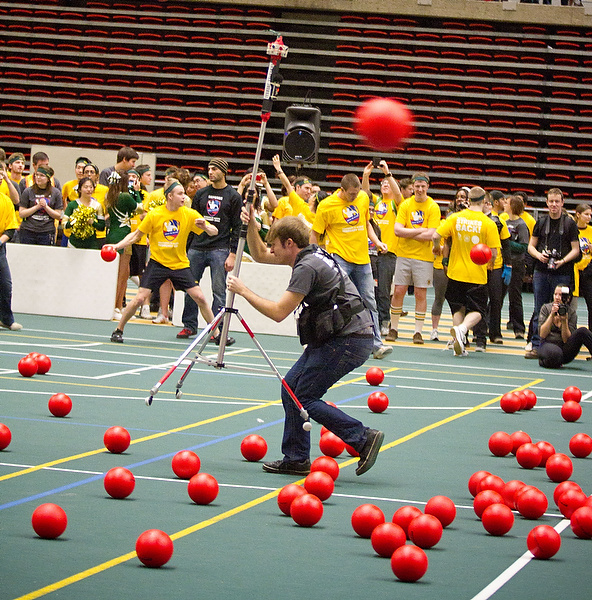
So last year I shot this video of the University of Alberta setting a world record for most people playing dodgeball and the video got over 650,000 hits.
I’ve seen a few 360-degree videos out there but not as many as you would think considering how freaking cool they are.
Since 360-degree videos is pretty uncharted territory in the photojournalism world I absolutely had to take the challenge.
To shoot my 360-degree dodgeball video I used four GoPro Hero HD cameras on 1280×960 mode mounted vertically. This gives enough overlap to get a full 360-degree view as well the cameras are nice and small and light. Since the cameras shoot at 30 frames per second (actually 29.97) you can think of it as 30 still pictures per second which can be stitched together into panoramas.
The short version of this story is that I shot with four GoPros, extracted still images from video, stitched the stills together into panoramas then recombined them back into video.
For the much more detailed and nerdy answer read on….
I got tips for arranging the cameras properly at diy-streetview.org
I simply used a plastic leg from a table that was the same width as the naked GoPro cameras.
I used Gaffers tape and a lot of elastics to hold the cameras in place.
In the future I may build a proper aluminum box for everything.
Setting up a fifth GoPro camera in the catwalk to be used for an overhead view for livestream of the game.
I use a Telus Aircard pluged into a Cradlepoint CTR-379 wireless router for internet for livestreams.
Here was my shooting process.
Hit record on my Olympus LS-10 PCM recorder. Say “scene one” out loud.
Hit Record on Camera 1. Say “camera one” out loud.
Hit Record on Camera 2. Say “camera two” out loud.
Hit Record on Camera 3. Say “camera three”out loud.
Hit Record on Camera 4. Say “camera four” out loud.
Now that everything is recording I clap my hands really fast or yelp really loud so that I have a sharp audio cue that I can sync all the cameras with.
Some people say “You’re crazy for putting your cameras in a dodgeball game like that!”
I say. It’s not about the camera. It’s about the end result. A camera is a tool like a hammer. If your hammer breaks, you get it fixed.
Never let your camera get in the way of a good photo.
As soon as the game ended I ingested all my footage into my MacBook Pro. It’s always important to get video up as fast as possible if you want to get a lot of views.
I just selected the first 60-seconds of the game and plunked it into Final Cut Pro. I created a large canvas and lined up the different cameras so that they overlapped a bit.
There would be very noticeable seams between the videos but I knew people wouldn’t mind the seams if they got to see the video asap. It took an hour to render the 60-seconds of video in Final Cut Pro and another hour to export it as FLV. The game ended around 1:30pm and I had a quick and dirty 60-second version of the panorama up on edmontonjournal.com before the 6:00pm news on TV! In comparison I think I had last year’s video up at the same time.
First year NAIT photography Student Nathan Smith was doing a ridalong with me that day and he was a HUGE help! He also shot all these awesome photos of me. Thanks!
Okay now for the high quality version with properly stitched images.
For post-processing I created a new timeline in Final Cut Pro 7 with codec Apple Intermediate Codec and size 3840×1280.
Since the cameras are mounted vertically they are recording 960×1280 video. So 4×960=3840.
I find my audio sync point on each camera and set it to be the in-point for the video. I drag each video from each camera into my timeline and line them up so that all the audio sync points line up.
Once my video and audio is all synced then I select each clip and go to “File–>Export –>Export Using Quicktime Conversion–> Image Sequence”
Final Cut Pro 7 extracts JPEG still images for every frame of video. Each frame is about 1.2MBs and you are shooting about 120 frames per second.
That works out to 8.6GB of stills for each minute of video you shoot. Or 520GB per hour.
Since there are four cameras each “frame” of video is actually four pictures which need to be stitched together into a single panorama.
I organize all the images using Photo Mechanic and batch name them 0001a, 0001b, 0001c, 00001d, 0002a, 0002b, 0002c, 0002d, etc.
Then I used PTgui Pro to stitch all my panoramas together into equarectangular panoramas.
PTgui Pro has a great batch process where you can setup a template for your first panorama and then it will auto stitch the rest of the panoramas in file order. This meant that (0001a, 0001b, 0001c, 00001d)–>Panorama1.jpg , (0002a, 0002b, 0002c, 0002d)–>Panorama2.jpg, etc.
I stitched them together in the highest resolution so that each panorama would be 3561×1308 pixels big. About 5MB per panorama. You are now at 18GB per minute of video or about a Terabyte per hour.
This process took the longest. I had three MacBook Pro laptops and my home server all going at the same time. The laptops took around 12 seconds per panorama to stitch.
If you do the math that works out six hours to stitch one minute worth of panoramas together!
I basically had four laptops crunching for 24 hours straight to make all the panoramas.
Once the tens of thousands of panoramas were stitched together I used Quicktime Pro File–>Open Image Sequence (at 29.97) to open all the still panorama images as a video. I then exported the video as .mov’s in Apple Intermediate Codec 3561×1308 at 280Mb/sec
I then created a new sequence in Final Cut Pro 7 with the same settings and dragged back in the .mov files and synced them with the .wav audio from my Olympus LS-10.
I chose about 17 minutes of footage in total to convert to panoramas and I then cut that down to the best 5 mins and exported as full-quality Apple Intermediate Codec.
I then used Adobe Flash Video Encoder to convert and downsize my video to FLV 2722×1000, On2 VP6, 2000kb video, 96kb audio which I find to be a good balance of quality to file size. It took about 8hrs for my 2.6GHz MacBook Pro to compress 5 minutes of video into 2722×1000 On2 VP6 Flash video.
Here is my puppy Mr. Woofertons napping while I wait for my video to compress.
Once the video is done compressing into FLV I then used KrPano as the flash panorama player to display the panoramic video as a 360-degree video.
It’s THAT easy!
I actually did this same process for my Murder of Crows time lapse last year but this was way more intense.
Next time I do this though I will wire the GoPro’s together so that I can trigger them all at the same time. My Olympus LS-10 has a remote trigger port too so I should be able to trigger all four cameras and my audio recorder at the same time which saves time syncing the videos in Final Cut Pro.
There may also be a way to get KrPano to play .mp4 instead of .flv so I could use an Elgato turbo.264 HD to speed up exporting the final video.
You could also write a few simple Applescripts to speed up the file renaming and automate Quicktime Pro. This could eliminate the need for Photo Mechanic and manually moving files around.
What did all this cost?
Four GoPro HD’s would be 4 x $300 = $1,200
Final Cut Pro is $1,000
Quicktime Pro is $30
Photo Mechanic is $150
PTgui Pro is $210
Adobe Flash is $700
KrPano is $150
Cheaper than a $6,000 Ladybug camera and a better field of view and higher resolution than a Pano Pro mirror. Though a PanoPro would be much much easier to use.
As crazy complicated as this may sound I wouldn’t be surprised if whatever Smartphone we all use in a couple years will do this with a 99-cent app.
What I love about 360-video is that almost everyone who sees it is blown away. I love how it opens your mind to new and exiting ways to tell stories.
A heart-broken Robot tries to escape the clutches of his moonshine-making Hillbilly imprisoner.
“Slow, subtle and direct – a mesmerizing Canadian sound”, “stark, calming, and mildly trance inducing lullaby-makers”, “Pearson has carved out a niche as a slow-core band — playing intimate, slow and sparse folk music.”
This was my first music video and the most fun I have ever had shooting. I actually shot this back in August 2009 and it took over a year to get it edited, coloured and EFx’d.
I was the Director of Photography so I took James’ awesome script and made storyboards and then shot everything. It was really fun to work with a director as I could focus on getting the shots and he could focus on directing and organizing everything. We made a good team.
The entire thing was shot in a day and a half! I drove in to Manitou Beach on Saturday morning. We started filming at noon and did all the scenes with the hillbilly as he could only be there on Saturday. Then we got everything else on Sunday and shot right until sundown. It was a miracle we had the same weather two days in a row and got everything done.
I shot everything with the Canon 5D Mark-II. It was actually my first time using one. My friend Kenny lent me his for the weekend. I read the manual and researched as much as I could before the shoot.
I knew that if I wanted the video to have a “film look” that I would need to:
1. Shoot at 24fps
2. Keep the shutter speed at 1/50th (2x the frame rate. On film cameras you shoot at 1/48th)
3. Shoot wide-open to get a narrow depth of field.
4. Use Neutral Density filters so that I could do #2. and #3. in bright sunlight.
I used my heavy Libec LS-38 tripod and head as much as possible and used a shoulder-mounted stabilizer whenever I needed to move.
For lenses I used a 50mm f1.4, 24mm f1.4, 16mm f2.8, 16-35mm f2.8, 24-105mm f4 IS, 70-200mm f2.8 IS and a 300mm f2.8 IS.
I bought two Cokin Neutral Density filters for a combined light reduction of 8-stops. This let me shoot 1/50, f1.8, ISO100 in bright sunlight.
Here are some fun behind the scenes photos. Enjoy!
The sun setting behind me as a drive from Edmonton to Saskatoon, SK on the Friday night before the weekend shoot.
5:40 a.m. on my drive from Saskatoon to Manitou Beach on Saturday, the first day of the shoot.
You know you are in Saskatchewan when...
Sign
James the director had the final script for me Saturday morning. I quickly drew up story boards and made shot lists. We were going to start shooting at noon.
Early morning. Finishing the robot costumes. The paint was still drying!
Will is putting the finishing touches on his costume.
Arms
Hand
Duct taping antlers on the front of the Hillbilly's truck.
We rented a pontoon boat for the first water scene. The boat was perfect for shooting because it didn't wobble on the water.
I used a Hoodman LCD Loupe and rubber bands so that I could see my LCD screen in the sunlight and focus easier.
I used two Cokin ND filters together to get a total of 8 stops of light reduction. This allowed me to keep my shutter at 1/50th with a wide open f2.8 aperture. One of the secrets to the "film look".
Will had to get into the dingy and then get dressed after.
Our hillbilly was awesome. We only had him for the first day though so we had to be sure to get every shot in.
Will could hardly see while he drove the dingy. Of course our hillbilly had a fan boat!
Looks much cooler with digital explosions.
A family member was our chef for the weekend and prepared lots of yummy vegitarian dishes.
Here is Vera Debevc, the owner of the old abandoned shrimp factory that we used for the hillbilly hideout and robot prison.
Vera Debevc and our hero.
After lunch we filmed the scene where the hillbilly kidnaps the robot in a quarry.
It took forever to get dressed and undressed.
Robot Love
More Robot Love
Oh No! The hillbilly!
You're gonna squeal like a pig
Oh No!
The light was perfect that night.
God I love lens flare!
Perfect drunk
Me wearing hipwaiters.
This is the light we had in the old shrimp factory. A single hole in roof. The Canon 5D Mark-II held up amazing in low light.
Freedom!
Oh no you don't!
A shot we never used in the film of the robot getting away.
Vera with the robot again outside of the old shrimp factory. She was so cute!
Final shot of the first day of shooting. We were now done all the shots with the hillbilly.
Day two. We need some more romantic shots of robot and ladybot together. There is James the director on the left.
This is my desktop background. I love this picture. So weird!
Robot sex scene!
Here you see how I filmed the robot sex scene. I mounted a 5D Mark-II with a 16mm fisheye lens above the bed on a monopod.
We used a monitor to frame everything.
Getting some shots of the band. We were going to have the band pop in and out of the video but it didn't make the cut.
Beautiful day.
Getting dressed again for the final shots.
Filming the robot reunited with his long lost love.
We were soooo lucky to have the exact same sunset both nights. The weather was perfect!
Even more robot love.
Sun is setting fast. Running out of time.
Rushing to the junk yard for the final scene.
Only a few minutes left before the sun is down. Need to get those final shots.
The tragic surprise ending.
The final shot.
Group photo of almost everyone involved in making the film.
Heading back to the cabins after a very long perfect day!
Posted by ryanjackson on Feb 2, 2011 in training, video
Ryan Jackson with the Edmonton Journal gives tips for capturing and editing quality video with an iPhone 4G or iPhone 3Gs for the purpose of video journalism.
Below is a screencast of me giving the presentation. 43 minutes total. I cover A LOT of stuff. Apps, technique, theory, shooting situations, editing and transmitting.
And here is my Google Doc presentation with all the links in it.
Last week the idea floated around of doing a “streeters” video asking OIlers fans how they felt about the season so far. We’ve done that before and it is typically boring. Also there is no still photo component to go in the paper.
So I got the idea to buy small white boards and ask fans to draw how they feel about the season and then do Vortraits (video portraits) of all of them explaining what they drew. Turned out much more interesting and then we had art for the newspaper.
Journal Photographers Ryan Jackson and Shaughn Butts setup a camera outside Rexall Place before the Oilers game on Thursday and asked fans to illustrate how they felt about the season on small dry erase boards. Video by Ryan Jackson and Shaughn Butts / Edmonton Journal
I used a 7-inch LCD4VIDEO HDMI monitor to help focusing with my Canon 5D Mark-II and 24-105mm IS lens.
I had a Rode VideoMic on a Magic Arm for the audio so that my hands could be free for focusing
I had two 160LED video lights I got off of eBay for the fill lighting. I put orange gels on them to balance the blue LED light with the sodium vapor ambient lights.
Here is my sketch of the portraits I wanted. It is always good to draw your idea out and email it to your editors so that they know what you are talking about.
And here is how it ran on the front page of the Journal. When someone comes to you with an idea that you don't think is good - don't just roll your eyes and complain - take that idea and make it into something better. Nothing good comes from cynicism. Great things come from people who take okay ideas and make them great ideas.
Okay here is an example of what I call a spectacle video. In the media we do a lot of these. Someone is performing a stunt or doing something strange to get attention to promote something.
In this case they are racing a horse against people at Northlands racetrack to promote Northlands and a marathon.
These events make great standalone pictures but video is always harder because the stunt only last a few seconds.
You can’t just put a 10-second clip on your website and expect people to watch a 15-second pre-roll add then walk away happy. You need more than that. You need a story.
So how do I get a one-minute video from an event that only last a few seconds?
Shows like Mythbusters are really good at taking something that only lasts a second like an explosion and dragging it out over a long period of time. Multiple cameras and slow motion help. But you can’t fill an hour of television with just that. You need anticipation, prediction and reaction to the event to really tell a story and make it interesting.
Here’s how I approach this video.
#1. I need A-Roll. A person of authority explaining what is happening today.
#2. I need B-roll to go with each thing that the interviewee mentions
Keywords: Horses, Humans, Media, Race
#3. I need to talk to the people who will be in the race. What are their predictions?
#4. The spectacle will only last a few seconds so I know I need more than one camera.
Camera 1: My Canon XH-A1 – This cameras has 20X zoom so I will put it at the end of the track.
Camera 2: Canon HV30 – I’ll put this camera at the beginning of the track and frame it on the starting gates. It can record 63 minutes to a tape so I just set it up and push record. Just leave it running.
Camera 3: Canon SD960 IS point-and-shoot camera that shoots 720p video. I set it up on a mini-tripod half way down the track and push record. Just leave it going.
Viewers decide if they want to keep watching a video in the first 10-seconds so I show the first 3-seconds of the race first to tease the viewer and hint that there is something cool coming. You better stay and watch!
I immediately go to by A-roll explaining what is happening today.
He's talking about horses so I show the only two horses that are on the track. Lame shot but it was all I had.
He talks about runners so I show the two runners that I see walking up.
I interview one runner and ask him for his predictions for the race.
This is a media spectacle so I show the other media there. Remember "say it and then show it". The media is mentioned in the interview so I show the media.
I interview the other runner and ask him for his predictions for the race.
Now I show the race. I have three cameras. One at the gates.
A second camera (a Canon Point-and-shoot on a mini-tripod) midway down the track to show the horse....
...followed by the runners....
Then my third camera is at the finish line. With my three cameras I was able to get a tight shot of the gates, a side view and an overall view.
Reaction. Emotion. High-Fives!
Followup reaction interview #1.
Followup reaction interview #2.
Ask the Jockey what he thinks. The end!
I get back to my car and ingest all the video footage into my laptop.
In Final Cut Pro:
I choose the A-roll “what is happening today”
I choose predictions “what do you think will happen?”
I choose the 3-second clip from Camera 2 and 3.
I choose the 12-second clip of the entire race from Camera 1. (yes the race only lasted 12-seconds!)
I choose the reaction clips “how was that for you?”
This is the beggining of a series of posts I’m going to make on shooting video.
As a way of teaching what to shoot when making videos I will explain my thought process and why I captured each shot in a few different videos.
For starters there is my Under the Big Top Circus Camp video I shot back in August 27, 2008.
Here is my formula for something like this.
#1. Get my A-Roll (someone explaining the story)
#2. Get a secondary A-Roll (someone else explaining story)
#3. B-roll B-roll B-roll. You need 10X the B-roll than your A-roll. Visuals to backup what the A-roll is saying.
Think of it like this. The A-roll stimulates the communication side of your brain. B-roll stimulates the visual side of your brain. If either side is boring then the video fails.
My process for a video like this:
I get to the event and immediately find someone of authority that I can ask to “tell me what is happening today.”
Frame the person nicely using Rule of thirds. Looking into the frame.
Ask them:
-Would you please spell your name for me? (pieces of paper get lost. get them to spell it out on tape)
-Please tell me your name and title.
-Tell me what is happening today AND what is the funnest thing about it?
-Tell me what the kids say about it.
-Tell me why it is important.
-Anything else you would like to add?
-Please spell your name one more time. (has saved by but several times. can’t hurt to get it twice incase the tape drops out of something goes wrong the first time)
-Do you have a cell phone you could be reached at if I have any other questions?
-Thank you!
Okay now I have my main interview. I’m safe. I just need to talk to one or two kids to ask them about the camp and I’ll be golden.
Bam! That’s it for A-Roll. #1. Get a person of authority to talk about what’s happening today #2. Get one or two other people to talk about what’s happening today
Now I just need some interesting B-roll a.k.a. “visual sequences” a.k.a. “coverup shots” to go with my A-Roll.
During the interview I payed attention to keywords:
Physical theatre. Puppetry. Magic. Concentrate. Professionals teaching. Happy kids. Tight-rope walking. Juggling. Stilts. Confidence. Skills.
A simple rule to remember for video. Say it and show it. If your interviewee talks about something then you have to SHOW or ILLUSTRATE that idea.
I know I need shots to go with each of those keywords in the interview.
Two things to remember for B-Roll
#1. Wide-Medium-Tight
A great rule to remember when shooting B-roll is wide-medium-tight. You can triple your B-roll by shooting a whole scene, then come in tighter on part of the scene, then really tight on the most interesting part.
Now instead of one shot that you can only use for 3-seconds you can go 3-seconds wide, 3-seconds medium, 3-seconds tight.
Not only have you tripled your B-roll but your B-roll is also more interesting!
#3. Sequence-Sequence-Sequence.
Don’t just stand in one place and get a one-minute clip of a person doing something. That is boring.
Instead get short, tight clips of each portion of what they are doing and build a sequence of events. MUCH more interesting.
I break down individual shots below. Watch the video again and look for each of these elements.
Tight Shots from various angles are important. I start the video off with this frame because it is tight and interesting. The visual side of your brain is immediately interested. Always start your video off with the most interesting shot you have. People decide if they are going to stay on a video in the first 10-seconds so it must be impactful.
A wide overall shot of all the kids. It is good to start out with a wide shot to show perspective and give the viewer an idea of where they are. If you shoot everything wide-medium-tight, wide-medum-tight, wide-medium-tight you will always triple your B-roll and make it more visually interesting. Bring your viewer into the scene.
Now I go tight on an interesting element of the previous overall. Notice I have my lens set to wide-angle and I simply moved my camera low and close to the cylinder. It is always better to "zoom with your feet" than to simply use your zoom lens. You will have less shaky video as well it makes for a more visually interesting frame.
A "peak moment" B-roll shot where the kids throw their wands in the air. This becomes a generic b-roll shot that I can use to coverup the a-roll.
Nice tight shot of a kid. Tight faces and eyes show emotion. It never hurts to have a few tight faces for use as B-roll. They show emotion in the video. If you are always wide-wide-wide-wide then viewers never feel engaged in the story as much. This frame grab was actually front page main art of the Edmonton Journal newspaper the next day.
Okay here I show the instructor and frame it with the kids feet. I could have shot this wide and shown the whole kid. But do I need the whole kid? No. It is more about the instructor and keeping just the feet makes it more interesting.
Outdoor scene setter. This is a B-roll shot that you can always get and always use. Simply show the viewer where you are. You can grab this on your way there or your way out. Can never hurt to get a shot of the building and it always comes in handy for B-roll in your video.
A tighter shot of the same building. Signs are always useful B-roll. If you see a sign, shoot it!
Main A-Roll interview. Get there, ask for a person of authority to talk to. Move them close to a window with nice light. Choose an interesting but-not-too-distracting background. Frame them using the rule-of-thirds and looking into the frame. Lock your tripod. Put a mic on them. Ask them to "Tell me your name and title. Tell me what's happening today. What's the most important thing? Why does this matter? Anything else you would like to add? Spell your name one last time. A phone number if I have any questions? Thank you"
Wide shot of all the kids. I've shown the viewer where we are. If I stay on this frame though it will get boring.
Bam! Go tight on a kid. Get him reacting to something.
Bam. Go tight (or medium) on two other kids interacting and reacting with something. I've made three interesting shots by showing the room wide and then showing some tighter elements from within the room.
Wide shot of kids in the room.
Tighter shot of one kid. Shoot from down low to eliminate distracting elements and focus on him.
Bam! Show what he is doing! I could have just kept the camera on the whole kid for 5-seconds but instead I show the whole kid, show the top of him, show what he is doing. More interesting than a locked-off wide shot of the whole kid.
Tight face. Faces show emotion and connect the viewer with the story. When your interview subject in the A-roll says "the kids are happy" you have a face to show that.
Another interview for my A-roll. Frame him using the rule of thirds. Try and find a quiet, clean background that is not-too-distracting. Lock the tripod. Move to the side and ask "Whats your name and title? Tell me what is happening today? What is the best thing about it? Why do you come here? Anything else you would like to add? How do you spell your name and how may I contact you if I have any other questions? Thank you."
Sequence sequence sequence. Don't just shoot a wide-angle of the kid walking across the tight rope. Show them getting on, tight shot of the top of her balancing....
Tight shot (with my wide angle lens) of her feet. If I had just showed her whole body it would be boring. If I shoot her wide-medium-tight and get a sequence of her getting on, balancing and walking then I have more interesting shots.
Golden Moments. This is more of an editing than shooting decision but sometimes it is good to just show a few seconds of natural sound and natural action. Here the teacher and the puppet are talking and high five eachother. It's cute. You don't need A-roll talking over it. You can just show this cute moment and give the viewer a break from the interview to experience what it was like to be there.
The kid surprised me when he picked up his puppet and started talking with it. Sometimes kids are really lame to talk to and other times they amaze you with golden moments.
Sequence 1 of 7. I could have stayed back 10-feet and shot a boring wide-shot of the instructor and the kid but instead I went tight on his hands....
Sequence 2 of 7. Shot down low to clean the background and emphasize these two subjects interacting.
Sequence 3 of 7. Get a tight shot of him tightening the straps.
Sequence 4 of 7. Back up and get a shot of the instructor helping the kid up.
Sequence 5 of 7. Wide shot showing perspective and them interacting.
Sequence 6 of 7. Detail shot. Get down low and show the feet and stilts.
Sequence 7 of 7. Reaction reaction reaction! I would have liked to have shown the kid's reaction but the instructor was actually more excited than the kid so I showed that.
Third A-roll interview. I had the last two people facing left so I get this kid to face right. Switch it up and make it more interesting. There weren't any interesting backgrounds around so I just moved him into the hallway (where it is also quieter) and use a clean white wall. Rule of thirds. Looking into the frame.
Sequence. Show the instructor talking to the kid.
Show what the kid is doing....
Show him doing his thing. If I had just stayed back 20-feet and got a long clip of him doing this it would be boring. Going in tight each element makes it more visually interesting and you can build a sequence that tells a story.
Use your zoom to compress the image. A super-wide image of the whole classroom would be boring because you aren't focusing in on anyone. Going medium-tght on just a few kids makes them larger and more interesting.
Tight shot of a kid practicing. You've got to pick certain people and focus in on them or else your video is general shots of general people. Find characters for your video and focus on them.
Another overall shot. Here I kept the camera low and locked in one place and just let the kids walk out of the frame. Starting out people always move the camera to follow the subject. Instead keep the camera steady and let the subject move in and out of the frame. It is more interesting.
Shoot from up high. Just like with still photography you don't want to suffer from "5-foot 9 syndrome" and shoot everything from the same perspective. Shooting up high or down low can clean your backgrounds and make it more interesting.
Peak action shot of kids practicing for generic B-roll. I just stood in one place and waited for the kids to do something rather than constantly moving the camera around looking for action.
My end shot. Just showing the kids applauding. Seemed like a relevant ending.
Nameplate. It is important to have branding when your videos are published in multiple platforms like YouTube, Vimeo, your website, etc.
A fun video project I did over new years. I shot this with the Canon PowerShot SD4000 which shoots 240fps video at 320×240. I used a 144 LED video light and an iPhone 4 for video lights. Video by Ryan Jackson / ryanjackson.ca
I converted the video files from the camera with MPEG Streamclip to Apple Intermediate Codec 640×480. This video was a good chance to brush up on using keyframes and markers to sync the video with audio.
We found a dozen reindeer near Leduc. Learn about this mysterious species and what makes them different. Video by Ryan Jackson / Edmonton Journal Read the story.