This summer I had a bunch of projects that required several hours of filming aerial video and photos. I wanted to get the smoothest possible video at an affordable price.
I knew I would use my Panasonic GH3 camera for a lot of the aerial video because it shoots 1080p60 at 50Mbits which would let me do a lot of slow motion.
A lot of great technology has become affordable lately for stabilizing your video camera.
There are two ways to stabilize your camera in a moving car or airplane. One is to use what I would call a robotic stabilizer with motors that counter move your camera to reduce shake.
Basically, if you turn your camera left, the motors will turn right to compensate.
The the gimbal system FreeFly MoVi made a lot of jaws drop when it was announced last year. Many similar and cheaper gyros and gimbals have also come on the market for smaller video cameras.
I plan to either buy or build one of these some day but for the time being I decided to build a more old fashioned stabilizer using spinning gyros.
The spinning gyro stabilizer has been around for years and is commercially made by Kenyon Labs. These are also known as gyros since there is a large spinning gyroscope inside which resists moving because it is spinning so fast. They are expensive but work very well.
I wanted to try building my own version of the spinning gyro for fun.
I found this blog post about using toy gyroscopes to make a DIY camera stabilizer. The gyros are small but they spin at 12,000 rpm so they resist movement pretty good.
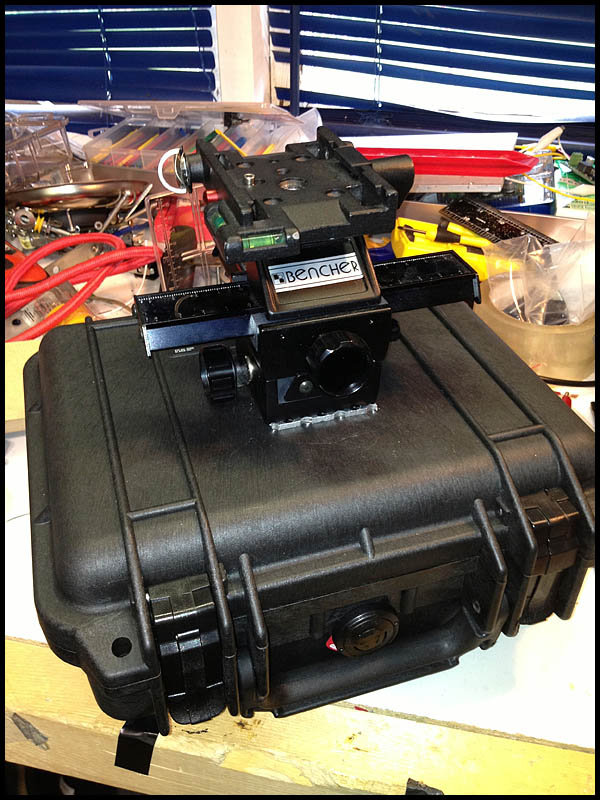
I ordered four of the gyros for about $400 and bought a small Pelican case to hold them and dampen the sound of the motors.
I used aluminum L tubing, tape and a lot of zip ties to hold everything in place.
A cheap 4-way macro slider from eBay would allow me to move the camera forwards, backwards or side to side for balance.
Heavy duty suction cups from Princess Auto allowed me to mount the whole apparatus to the sunroof in my SUV.
Here I am mounting it in a helicopter to do aerial video for this story
Here I am using it in a truck. It worked really well for stabilizing the camera while driving.
The result?… Since I’ve never used a real commercial motorized or spinning disk gyro I can’t really compare but I would say that the gyros did stabilize my light weight Panasonic GH3 more than if I was just hand holding it.
However for the price ($450+) of building the device, and the hassle of mounting the rig in an airplane I think I would rather rent a Kenyon Labs or Freefly Movi next time. My DIY solution was certainly better than nothing but didn’t make a huge night and day difference like I had hoped. Maybe night and sunrise.
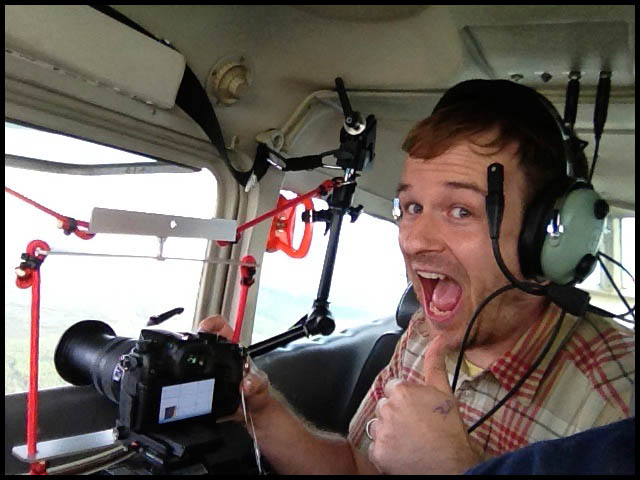
Here you can see the ridiculous way I had to mount the rig in a Cessna airplane. Not super practical.
I also found there were other things that made a bigger difference in the smoothness of aerial footage. One big issue I had with my footage was rolling shutter also known as the “jello effect” when I zoomed in a lot with my GH3 and 14-140 IS kit lens. The footage looked great at wide angles but when I zoomed in a lot, the micro vibrations of the airplane (and probably the gyros too) made the video unwatchable.
Any digital camera with a CMOS sensor will have this problem unfortunately. Way more expensive cameras have global shutters that don’t jello.
Also weather and time of day (heat) will dramatically effect the smoothness of your footage because of turbulence. I flew in small Cessna airplanes for $250/hour but was only able to get a few minutes of rock solid footage. The rest was bumpy garbage. A helicopter costs more than $2000/hour but you can be way more productive and smooth in a helicopter compared to a Cessna.
One last thing. I edit in Final Cut Pro X and although it has a digital video stabilizer filter built-in, there is a way better filter called Lock and Load. For $99 it is worth every penny. Not only does it stabilizer better but it is also way faster at rendering.
Can you tell the difference? About 2/3 of the footage in this video was shot with a Panasonic GH3 on my gyro stabilizer and 1/3 was shot handheld with a Canon 5D Mark-III shooting RAW video and a Zacuto loupe pressed against my face. It was all shot in small Cessna airplanes which are super bumpy and rough to fly in hence wanting the stabilizer.
I got the assignment to film 10 Journal reporters and editors discussing the top 10 news stories of the year in their own words.
I decided to use some of the gear and techniques I’ve been developing to shoot and present the video.
Rather than shooting 10 separate videos and presenting them as 10 separate clips, I put them all together in one YouTube video and used annotation buttons to make the video interactive. You can jump back and forth between clips and choose which stories you are most interested in.
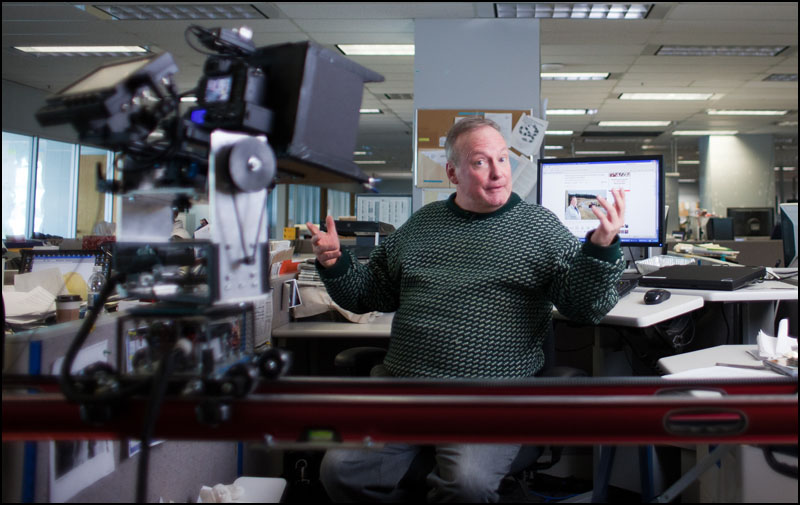
Since the videos are mostly just “a person sitting at a desk talking” I decided to up the production value a but and have the camera constantly moving.
I built a Pan/Tilt/Slide robot for doing timelapse videos in the summer. I used it for the World’s Longest Soccer Game Video but now I would need it for video instead of stills.
I made it programmable so I can tell it to start in position A, then take X number of minutes to move to position B. The device consists of three stepper motors and three Phidget stepper controllers.
Everything is programmed in Python. Those years spent in Electrical Engineering and Computer Science come in handy!
I used my hacked Panasonic GH2 for the video and my Olympus LS10 audio record with a Sennheiser wireless mic for sound.
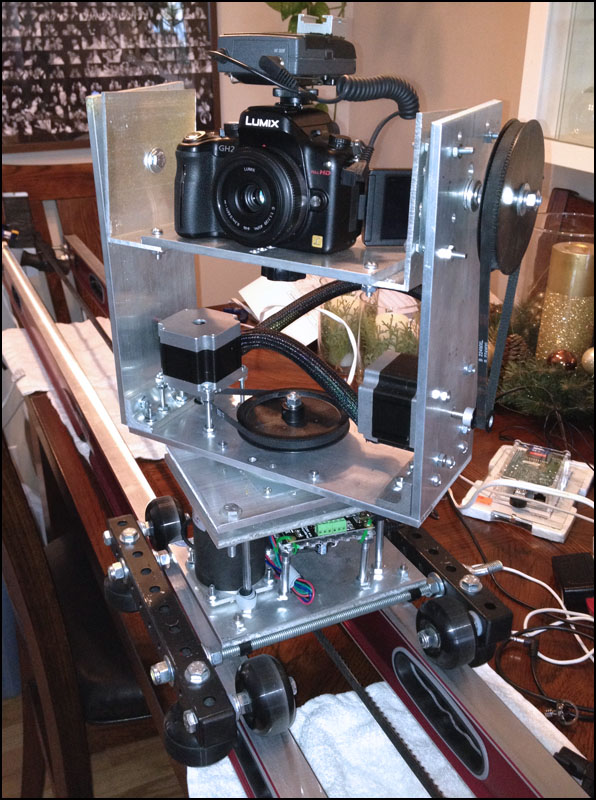
Here is my Pan/Tilt/Slide robot that I’ve been working on for months. I added 8:1 ratio pulleys to the motors to make the movements smoother and slower. I also surrounded the motors with plastic to dampen the sound. (not shown here). The design is constantly changing which is why I haven’t blogged about it much. Though I guess I should blog about all the changes!
I made a DIY teleprompter using cardboard, tape and my iPad running the Teleprompt+ app. This was my first time recording reporters with a teleprompter and it made my life so much easier! The subject doesn’t have to fumble for words and some say it makes them forget about the camera a bit.
Here is the very rough version 1.0 of my Pan/Tilt/Slide robot controller. I plan to eventually control everything with an iPad app that I’m writing so there’s far less wires!
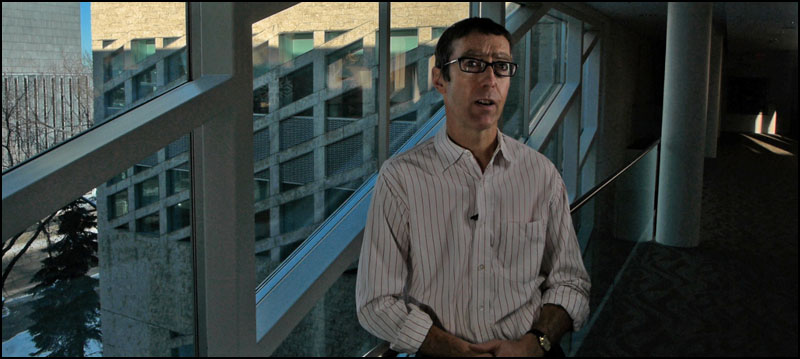
Frame grab of David Staples from the video. I just used two 500LED lights for him.
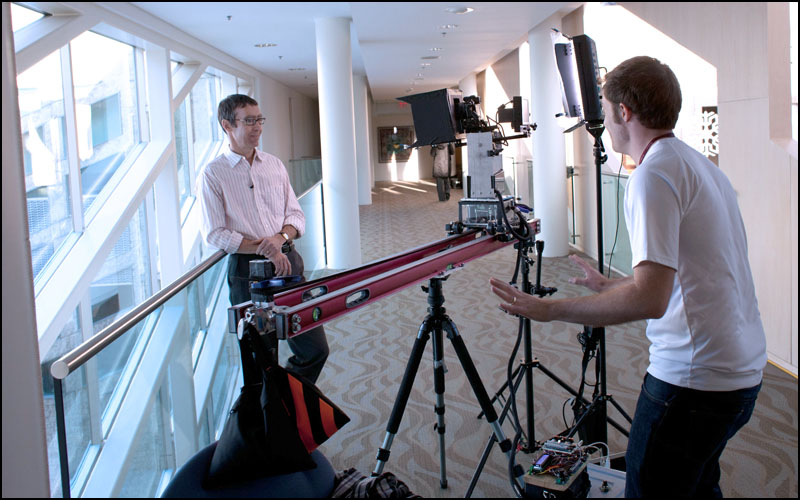
Here is my setup for David Staples in City Hall. My assistant and friend Megan Voss is on the right.
Frame grab of Gordon Kent from the video. I just used two 500LED lights really close to him. The sunlight coming through the window was much brighter than the video lights so they had to be placed close.
Gordon Kent in City Hall talking about the hockey arena saga. It was hard to balance him against the bright window with only two 500LED light panels so I underexposed him a bit and then brought up the shadows in post. Photo by Megan Voss.
My setup for Graham Thomson in the Alberta Legislature talking about former Alberta Premier Peter Lougheed’s death. I got Graham to stand on a box so that I could frame him with the portrait.
Frame grab of Stephanie Coombs from the video. She has a 1800-watt 48″ Octobox to her left and one 500LED video light to her right.
Stephanie Coombs at her desk to talk about the Hub Mall shooting. You can see I used my Olympus LS10 audio recorder connected to my wireless Lav for sound. It’s always better to record your sound separately and monitor it with headphones. Photo by Megan Voss.
A frame grab of Sandra Sperounes from the video. I just used the light on her desk and a small Light Panel with an orange filter off to the left.
Sandra Sperounes at her desk talking about the Paul McCartney concerts. Photo by Megan Voss.
Marty Klinkenberg at his desk to talk about Highway 63. Photo by Megan Voss
Frame grab of Jim Matheson from the video. I used two 500LED lights and one small Light Panel as a hair light.
Jim Matheson in Rexall Place to talk about the NHL Lockout. I wanted to film him in Rexall place to illustrate the empty stadium seats and lack of hockey.
Using the Pan/Tilt/Slide robot added a ton of work to the setup for each video but it really made the videos more visually dynamic. It also moved the camera much smoother and consistent than if I moved it by hand.
I certainly wouldn’t do this for most news video but a fun feature like this was a perfect opportunity to test out some new tools.
Andrew Satter @asatter discusses innovative video techniques. Ryan Jackson @ryan_jackson talks about his 360-video projects and an open discussion on video with the audience happens at the end. Enjoy! Sept. 22, 2012 at Online News Association annual conference ONA12 in San Francisco. http://www.ryanjackson.ca http://www.asatter.com
Ashley and I are driving back to Edmonton from San Francisco and I have limited internet connectivity so this blog post will be fully updated with links and quotes in a couple days.P.S. If you ever get a chance to drive the west coast, DO IT!
This is a super duper quick list of the links I’ll be sharing at the #ONAunconf Unconference session at the 2012 ONA conference in San Francisco
Try to do something different. NOT TV. “make something worth talking about” – Seth Godin.
-Multimedia — use best tool to do the job. … sometimes video, sometimes sound slides, sometimes panoramas, sometimes interactives.
– I want there to be a holodeck like on Star Trek!
-I want to have the news beamed into my brain like in the Matrix or Simpsons.
PICTURE
-We’re going to get there before you know it
-28 mins of video here. people spent WAY more time on it than if it was just a normal linear video.
-think backwards. how do you wish you could watch long videos that are boring?
Immersive Video
-Best viewed on iPad.
-now this is cheesy but think of it as a little town. You could do panoramas of a small town or neighborhood and make it so you go to each section and talk to people.
-360 video on a Roller Coaster
-Start with one thing and build build build on it.
-i use KRpano.
-interfaces with VR headsets and game controllers.
-360 isn’t for everything
-A LOT OF TIME.
-must be super duper interesting topic to get good ROI
-must be something worth looking around for.
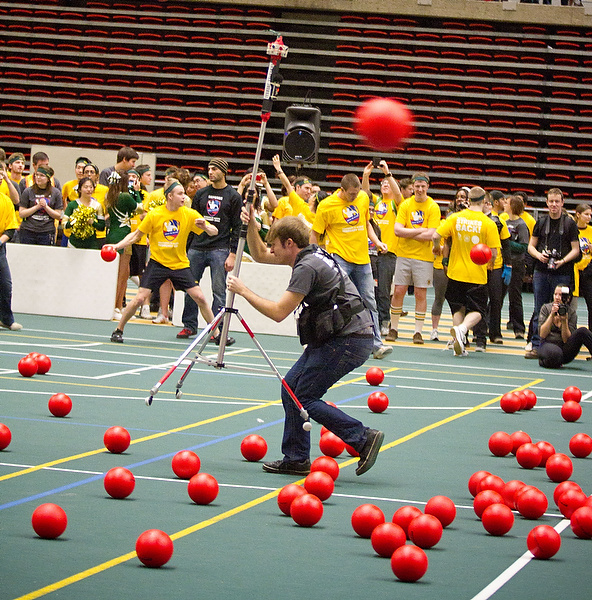
In 2011 the U of A broke the record again and captured it with a 360-degree video camera that I built.
This year the record would be set again with 5,000 students participating. I figured this was a great opportunity to do a GigaTag where you make a GigaPan image and link it with Facebook so all 5,000 participants can tag themselves and their friends on Facebook.
I’ve shot dozens and dozens of panoramas over the years and one challenge is always movement between frames. I wanted to capture a GigaPan image of the 2012 World Record Dodgeball Game but it would be impossible with one camera shooting multiple images.
The solution?
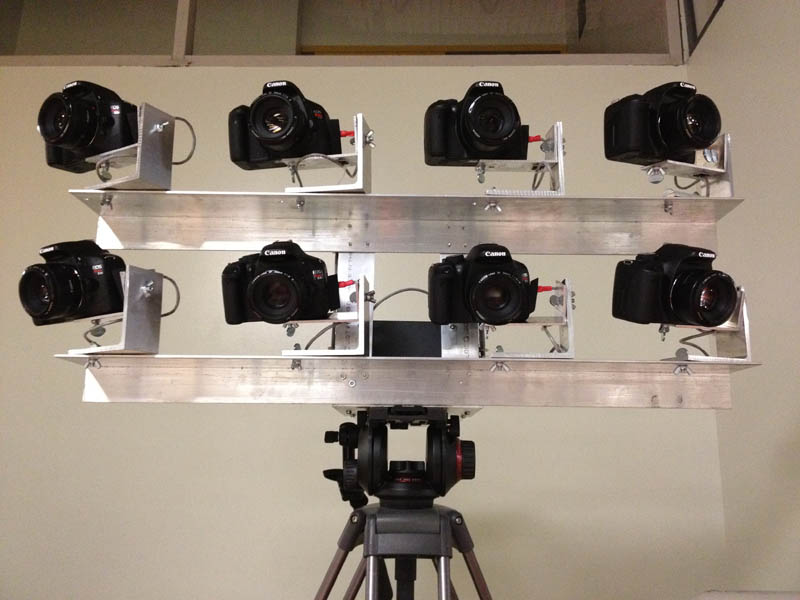
Here is my crazy “Octo-Cam” made from aluminum and eight Canon Rebel T2i’s with 50mm f1.8 lenses. Each camera shoots 18 megapixels and when I stitched the images together with PTgui I can create a 220MP panorama!
Photo by Fish Griwkowsky.
AMAZING thanks to Don’s Photo for lending me the eight Canon Rebel T2i cameras and Canon 50mm f1.8 lenses.
I went to Metal Supermarkets with my design and they cut all of the 2″ x 4″ aluminum for me in an hour! In total it only cost about $120.
It took about eight hours to drill and assemble the frame and another eight hours to wire everything together. I used a PocketWizard Multi-Max to trigger the cameras.
Eight cameras means eight battery chargers! I was amazed that the batteries were able to last for over 2,700 images. They weren’t even dead!
Stitching test photos with PTgui. The final resolution depends on how much overlap you have between images.
I had PTgui interpolate the image to make it the maximum 25,000 pixels wide that JPEG allows.
So last year I shot this video of the University of Alberta setting a world record for most people playing dodgeball and the video got over 650,000 hits.
I’ve seen a few 360-degree videos out there but not as many as you would think considering how freaking cool they are.
Since 360-degree videos is pretty uncharted territory in the photojournalism world I absolutely had to take the challenge.
To shoot my 360-degree dodgeball video I used four GoPro Hero HD cameras on 1280×960 mode mounted vertically. This gives enough overlap to get a full 360-degree view as well the cameras are nice and small and light. Since the cameras shoot at 30 frames per second (actually 29.97) you can think of it as 30 still pictures per second which can be stitched together into panoramas.
The short version of this story is that I shot with four GoPros, extracted still images from video, stitched the stills together into panoramas then recombined them back into video.
For the much more detailed and nerdy answer read on….
I got tips for arranging the cameras properly at diy-streetview.org
I simply used a plastic leg from a table that was the same width as the naked GoPro cameras.
I used Gaffers tape and a lot of elastics to hold the cameras in place.
In the future I may build a proper aluminum box for everything.
Setting up a fifth GoPro camera in the catwalk to be used for an overhead view for livestream of the game.
I use a Telus Aircard pluged into a Cradlepoint CTR-379 wireless router for internet for livestreams.
Here was my shooting process.
Hit record on my Olympus LS-10 PCM recorder. Say “scene one” out loud.
Hit Record on Camera 1. Say “camera one” out loud.
Hit Record on Camera 2. Say “camera two” out loud.
Hit Record on Camera 3. Say “camera three”out loud.
Hit Record on Camera 4. Say “camera four” out loud.
Now that everything is recording I clap my hands really fast or yelp really loud so that I have a sharp audio cue that I can sync all the cameras with.
Some people say “You’re crazy for putting your cameras in a dodgeball game like that!”
I say. It’s not about the camera. It’s about the end result. A camera is a tool like a hammer. If your hammer breaks, you get it fixed.
Never let your camera get in the way of a good photo.
As soon as the game ended I ingested all my footage into my MacBook Pro. It’s always important to get video up as fast as possible if you want to get a lot of views.
I just selected the first 60-seconds of the game and plunked it into Final Cut Pro. I created a large canvas and lined up the different cameras so that they overlapped a bit.
There would be very noticeable seams between the videos but I knew people wouldn’t mind the seams if they got to see the video asap. It took an hour to render the 60-seconds of video in Final Cut Pro and another hour to export it as FLV. The game ended around 1:30pm and I had a quick and dirty 60-second version of the panorama up on edmontonjournal.com before the 6:00pm news on TV! In comparison I think I had last year’s video up at the same time.
First year NAIT photography Student Nathan Smith was doing a ridalong with me that day and he was a HUGE help! He also shot all these awesome photos of me. Thanks!
Okay now for the high quality version with properly stitched images.
For post-processing I created a new timeline in Final Cut Pro 7 with codec Apple Intermediate Codec and size 3840×1280.
Since the cameras are mounted vertically they are recording 960×1280 video. So 4×960=3840.
I find my audio sync point on each camera and set it to be the in-point for the video. I drag each video from each camera into my timeline and line them up so that all the audio sync points line up.
Once my video and audio is all synced then I select each clip and go to “File–>Export –>Export Using Quicktime Conversion–> Image Sequence”
Final Cut Pro 7 extracts JPEG still images for every frame of video. Each frame is about 1.2MBs and you are shooting about 120 frames per second.
That works out to 8.6GB of stills for each minute of video you shoot. Or 520GB per hour.
Since there are four cameras each “frame” of video is actually four pictures which need to be stitched together into a single panorama.
I organize all the images using Photo Mechanic and batch name them 0001a, 0001b, 0001c, 00001d, 0002a, 0002b, 0002c, 0002d, etc.
Then I used PTgui Pro to stitch all my panoramas together into equarectangular panoramas.
PTgui Pro has a great batch process where you can setup a template for your first panorama and then it will auto stitch the rest of the panoramas in file order. This meant that (0001a, 0001b, 0001c, 00001d)–>Panorama1.jpg , (0002a, 0002b, 0002c, 0002d)–>Panorama2.jpg, etc.
I stitched them together in the highest resolution so that each panorama would be 3561×1308 pixels big. About 5MB per panorama. You are now at 18GB per minute of video or about a Terabyte per hour.
This process took the longest. I had three MacBook Pro laptops and my home server all going at the same time. The laptops took around 12 seconds per panorama to stitch.
If you do the math that works out six hours to stitch one minute worth of panoramas together!
I basically had four laptops crunching for 24 hours straight to make all the panoramas.
Once the tens of thousands of panoramas were stitched together I used Quicktime Pro File–>Open Image Sequence (at 29.97) to open all the still panorama images as a video. I then exported the video as .mov’s in Apple Intermediate Codec 3561×1308 at 280Mb/sec
I then created a new sequence in Final Cut Pro 7 with the same settings and dragged back in the .mov files and synced them with the .wav audio from my Olympus LS-10.
I chose about 17 minutes of footage in total to convert to panoramas and I then cut that down to the best 5 mins and exported as full-quality Apple Intermediate Codec.
I then used Adobe Flash Video Encoder to convert and downsize my video to FLV 2722×1000, On2 VP6, 2000kb video, 96kb audio which I find to be a good balance of quality to file size. It took about 8hrs for my 2.6GHz MacBook Pro to compress 5 minutes of video into 2722×1000 On2 VP6 Flash video.
Here is my puppy Mr. Woofertons napping while I wait for my video to compress.
Once the video is done compressing into FLV I then used KrPano as the flash panorama player to display the panoramic video as a 360-degree video.
It’s THAT easy!
I actually did this same process for my Murder of Crows time lapse last year but this was way more intense.
Next time I do this though I will wire the GoPro’s together so that I can trigger them all at the same time. My Olympus LS-10 has a remote trigger port too so I should be able to trigger all four cameras and my audio recorder at the same time which saves time syncing the videos in Final Cut Pro.
There may also be a way to get KrPano to play .mp4 instead of .flv so I could use an Elgato turbo.264 HD to speed up exporting the final video.
You could also write a few simple Applescripts to speed up the file renaming and automate Quicktime Pro. This could eliminate the need for Photo Mechanic and manually moving files around.
What did all this cost?
Four GoPro HD’s would be 4 x $300 = $1,200
Final Cut Pro is $1,000
Quicktime Pro is $30
Photo Mechanic is $150
PTgui Pro is $210
Adobe Flash is $700
KrPano is $150
Cheaper than a $6,000 Ladybug camera and a better field of view and higher resolution than a Pano Pro mirror. Though a PanoPro would be much much easier to use.
As crazy complicated as this may sound I wouldn’t be surprised if whatever Smartphone we all use in a couple years will do this with a 99-cent app.
What I love about 360-video is that almost everyone who sees it is blown away. I love how it opens your mind to new and exiting ways to tell stories.
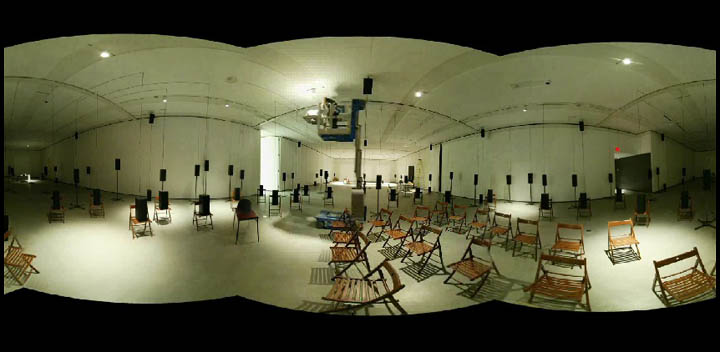
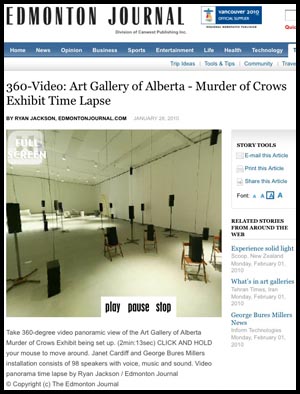
Watch a time lapse in 360-degree Video ….that’s right…a 360-degree video panorama! Click on the image to the left.
Watch a time lapse of the Murder of Crows sound exhibit being set up at the Art Gallery of Alberta. 98 speakers are set up over a two week period. Time progresses all around you as you click and move your mouse to look all around.Video by Ryan Jackson /Edmonton Journal.
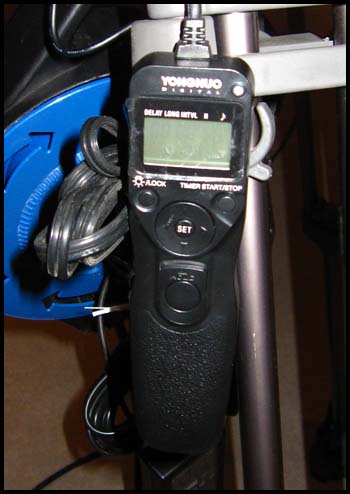
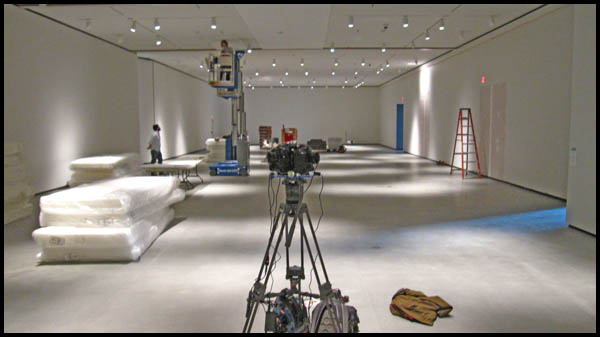
To build make this 360-video I had to build a special rig with three cameras. I used this before for my Indy Panoramas back in the summer. The rig consists of three old Canon 1D d-SLRs with three Peleng 8mm fisheye lenses in a 120-degree offset pattern. The three cameras are wired together to be triggered by an intervalometer. The rig is super heavy and annoying because triple cameras means triple the things to go wrong. If the shutter speed or focus or anything is wrong on one off the cameras then the whole panorama is ruined.
The 1D cameras can only handle 2GB Compact Flash cards which is around 2000 images. I set the intervalometer to trigger the cameras every two minutes which meant I had to change the cards every two days. In total nearly 30,000 images were taken (10,000 per camera).
For post-processing the images, I used Photo Mechanic to organize the images by time taken. I had set the clocks on the cameras to be 1-second apart so when Photo Mechanic sorted the images by time taken, they would go 1st camera, 2nd camera, 3rd, camera, etc.
I then renamed all the images so the files went 0001, 0002, 0003, etc.
I use PTgui to stitch all my panoramas together. It has a great batch process where you can setup a template for your first panorama and then it will auto stitch the rest of the panoramas in file order. This meant that (0001, 0002, 0003)–>Panorama1.jpg , (0004, 0005, 0006)–>Panorama2.jpg
Needless to say this took HOURS and HOURS to process but I just let my laptop chug away overnight for three nights until I had a folder filled with thousands of stitched panoramas.
I then looked through that folder of panos with Photo Mechanic and removed all the boring images where nothing is moving or being installed (ie. at night time, during lunch break, days off, etc).
I then took the folder of usable panorama images and put them into a video using Quicktime Pro’s “open image sequence.”
I set the frame rate to 12fps so that 1606 images would become a 2-min:13-second video.
I then told Quicktime Pro to export the video and I used the Adobe Flash Video Encoder Plug-in to export the video as an .flv Flash video file using On2 compression, 2000×1000 resolution, 12fps, 1200kB/s bitrate. This made about a 20MB video file.
I purchased the panorama player krpano which supports video. I only had to alter a little bit of the .xml code to add a full-screen button and a play/pause/stop button. I plunked the krpano files on a server and embedded it in an iframe in a story page.
The whole project was pretty cool. I hope to use this camera more in the future but as you can see, it is A LOT of work. There are other, far easier methods of doing 360-video but you have to buy expensive cameras and lenses. For this setup I only had to buy a couple more 8mm lenses and use The Journal’s old 1D’s. My rig only shoots stills and you have to make them into a video… for real video check out CNN’s 360-degree video from Haiti. Pretty crazy!
Here are the images of my DIY 360-degree video panorama camera.
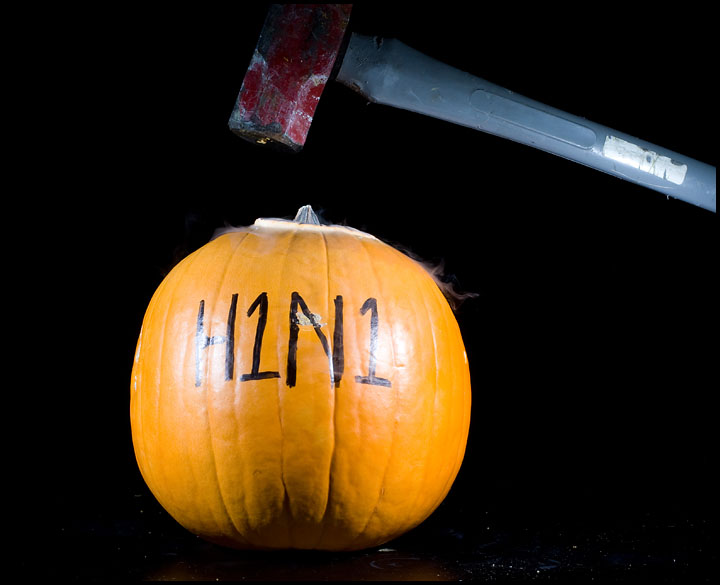
Watch the video. Definitely one of the coolest projects I have ever worked on. We asked readers what worried them and then wrote those worries on pumpkins and blew them up! I felt like I was on the show Myth Busters all week. DO NOT TRY THIS AT HOME. All of these photos were taken under the supervision of experienced professionals.
Click the image above to watch the video on the Journal website.
Aside from the the joy of destroying pumpkins this also gave me a chance to take extreme high-speed photos. I’ve wanted to do this for a long time. You see when a flash is set to its lowest power setting the flash duration becomes extremely fast. On Kevin Lewis’ Blog I found that a Canon Speedlite at 1/128th power has a flash duration of 1/35,000 sec.
This means that whatever is caught by your flash is “frozen” at 1/35,000 sec since the flash is the only light exposing it. In order to do this though you need to keep the ambient light out either by shooting in the dark or shooting at a high aperture like f22 so the only light hitting the object is flash.
Here you see two hammers. That’s because the sound trigger set off the flash when the the hammer hit the pumpkin and then again when it hit the table. There was a 0.2 second delay set for the sound trigger.
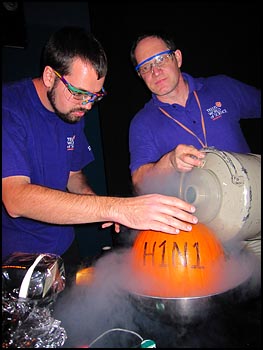
A pumpkin is frozen in liquid nitrogen by Matt Green, Staff Interpreter. left and Frank Florian, Director of Public Programs at the Telus World of Science in Edmonton on October 2, 2009. Photo by Ryan Jackson / Edmonton Journal
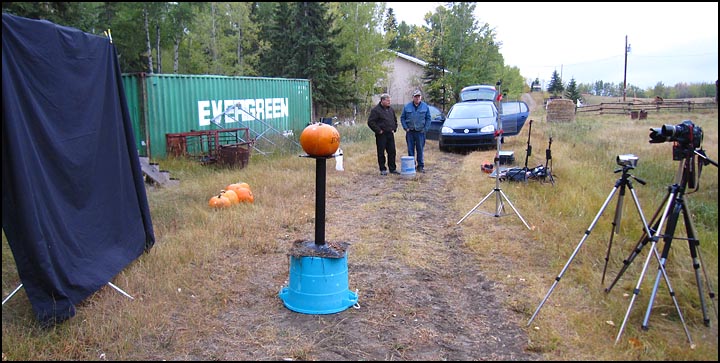
Here is the setup for the frozen pumpkin shot. I built a sound trigger and plugged it into my Pocketwizard Multimax so I could set a delay from the time the sound was made till the time the flashes went off. The problem with this method is that it takes a lot of trial and error to get the time delay right and we only had three pumpkins.
The sound trigger circuit is just a simple 400V SCR circuit connected to the headphone output of my audio recorder which simply acts as a mic and amplifier.
Now we move on to the exploding pumpkins! Dr. Roy Jensen with the Chemistry Department at Grant MacEwan was very excited to help me with this project. I can’t tell you what he used to blow up the pumpkins but I can say that it was in a balloon and ignited with an electric sparker. Roy also had the very important idea to score (slice) up the inside of the pumpkin with a knife so that it blew up semetrically. We also put a little bit of corn starch in the balloons to add a powdery haze.
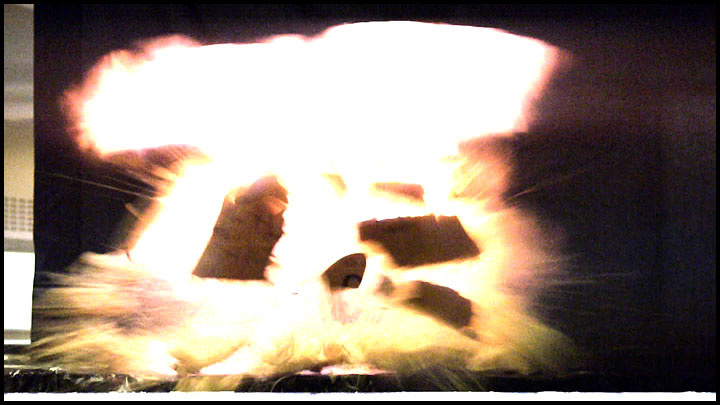
This is actually a frame grab from my Canon XH-A1. The camera was set to 1/500th shutter speed and shot in 60i. Though it “caught the moment” the quality isn’t there.
Can you tell the difference? I was amazed what a camera shooting 10 fps can catch in an explosion. It’s not as much about the explosion (which only lasts microseconds) but the re-action after.
Frame grab.
Still image. Three flashes. Just awesome!
Frame grab again. The next frame after this one is at the top of this post.
For the exploding pumpkins in the MacEwan University Chemistry lab I didn’t bother with the sound trigger. Instead I just had a Canon 1D Mark-III bursting at 10 fps and a Mark-IIn bursting at 8 fps. Since the cameras have a 2 fps speed difference they fired out of sync which means I was getting about 18 fps of stills combined.
I doubled up the flashes so that I would only need two stands instead of four. One camera had two flashes and was triggered by Pocketwizard Flex 5’s and the other one had three flashes that were all hard wired. Both sets of flashes fired every time with no problem. The Pocketwizards fired just as good as the hard-wired flashes. The flashes were at 1/128th power and zoomed to 24mm.
The cameras were both set at 1/250th (sync) shutter speed, F22, ISO400 so there wasn’t any ambient light in the exposure. Only flash which lasted 1/35,000 sec thus freezing the explosions.
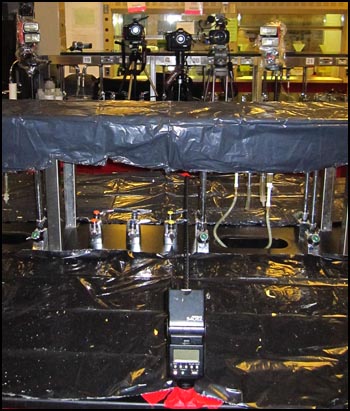
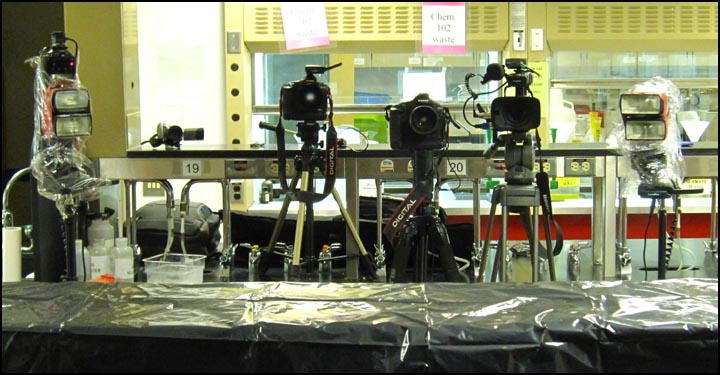
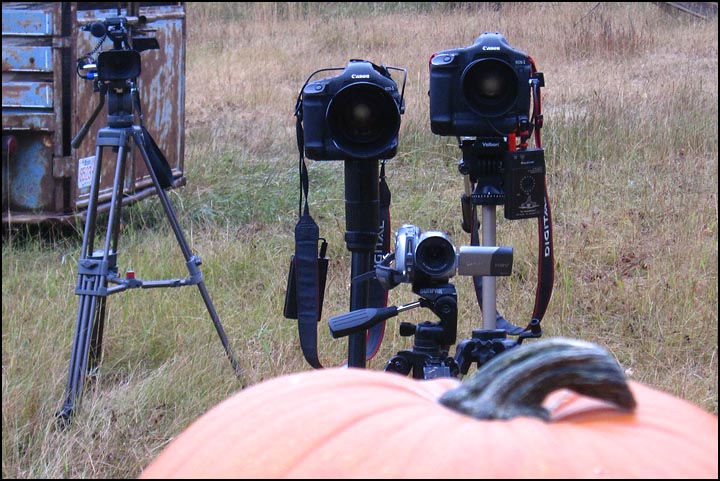
Here you can see the Canon XH-A1 video camera, the Canon 1D Mark-III and the 1D-Mark IIn. There was also a Canon HV20 video camera and a Canon SD960 IS point and shoot camera on video mode. The cameras were tiggered by Pocketwizards so I could stand a safe distance back.
As you can see the pumpkins did a little damage to the ceiling. There…was….pumpkin…..EVERYWHERE!
Now for the shotgun photos.
This photo was done with two flashes. One to the left and one to the right.
This photo was ambient light at 1/2000 sec.
For the shotgun photos I did a similar setup as the exploding pumpkins. Three video cameras and two still cameras shooting a combined 18 fps.
I placed a sheet of plexy glass in front of the line of cameras incase a pellet from the shotgun went astray. (Just being paranoid.)
Here you can see the two video cameras (the third one was used to take this photo), the two still cameras and three flashes. One camera had two flashes and the other one only had one.
Finally you can see the black king-sized bed sheet that I used for a backround. I bought the sheet at Walmart for cheap and then draped it over a monopod superclamped to a light stand.
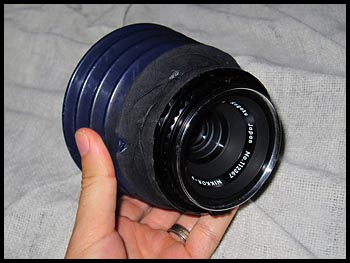
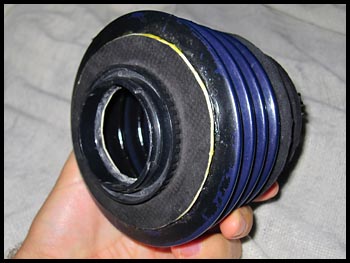
Here is my DIY Tilt-Shift lens. It is a 75mm f2.8 medium format lens I bought off ebay for $30 plus a $5 toilet plunger that I cut down.
I inserted the lens inside the plunger and wrapped black hockey tape around it. I then superglued a Canon EOS body cap on the back of it.
If you build this yourself be sure to cut small holes in the bellows to allow air to escape. The first time I used this lens I wrecked the shutter in my Mark-II because of the air pressure! I didn’t use it for two years because of that. I finally just cut two holes and now it works fine.
You have to use a medium format lens for this (35mm lenses won’t work) because MF lenses produce a larger imaging circle and are meant to be positioned farther away from the “film” (sensor) of the camera.
I used this lens for this and this picture. Notice how the face is in focus and the rest is out of focus. That is because I tilted the lens so that so that the plane of focus crosses the face. Since nothing else falls in the plane of focus it goes out of focus ( a.k.a. bokeh).
It’s an artsy effect and can come in handy but this isn’t a lens you can use all the time.
Dion Lizotte was charged by wildlife officers who refused to accept his Metis settlement card as proof of his ancestry after he shot a moose near the Paddle Prairie Metis Settlement in northern Alberta two years ago. Photo by Ryan Jackson / Edmonton Journal.
I used my handy DIY Tilt-Shift lens to make this photo. It was a cloudy day so I set a Canon 550EX flash set at 24mm zooom off to the right of Dion. I then pointed set it bout 2 feet lower than his head and tilted it away from him a bit so that the flash wasn’t pointed directly at his face (basically feathering the light on him).
I backed away into some tree branches and focused on him with my 75mm f2.8 DIY Tilt-Shift lens which gives the stange blurring effect since the plane of focus crosses his face and the branches but nothing else = everything is in bohek except his face.
Posted by ryanjackson on Sep 24, 2009 in DIY, lighting
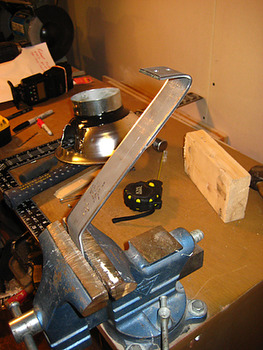
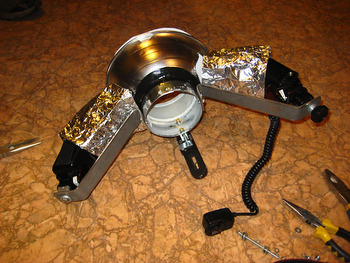
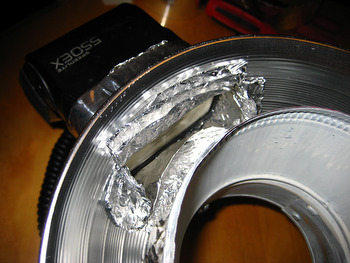
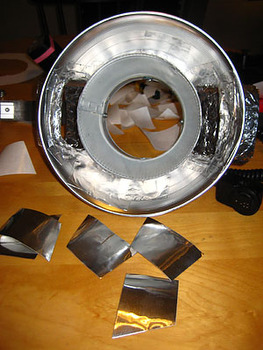
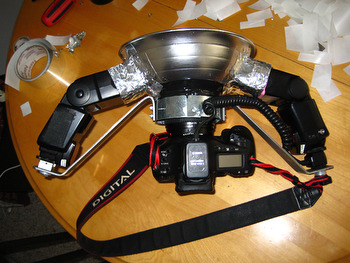
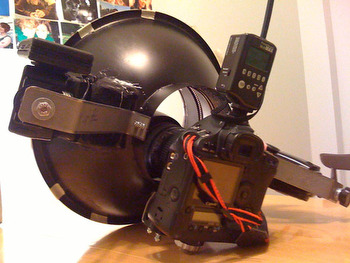
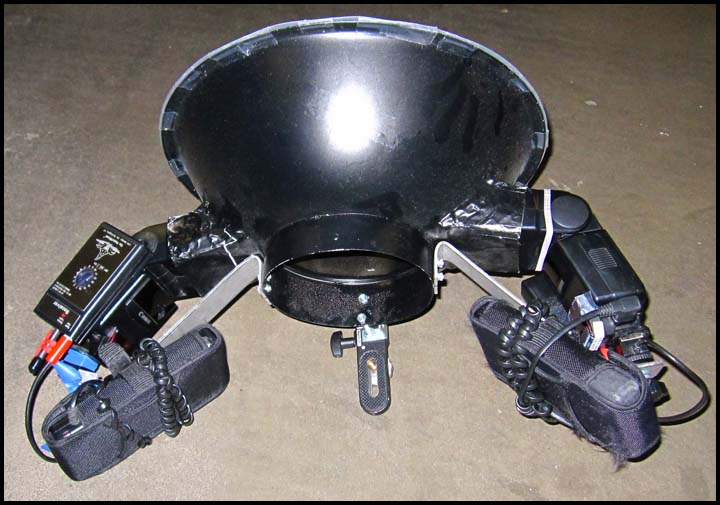
I built my DIY Ring Flash back in March by following this YouTube video
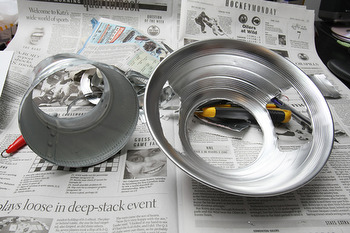
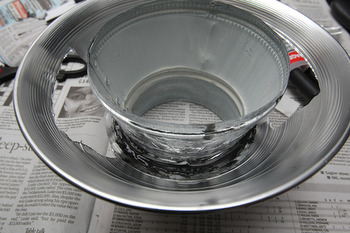
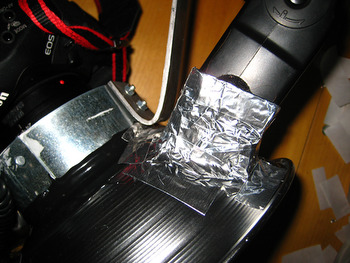
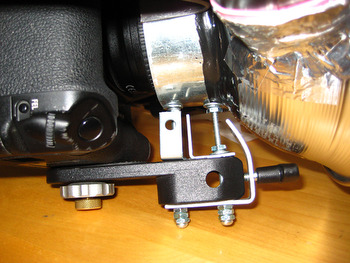
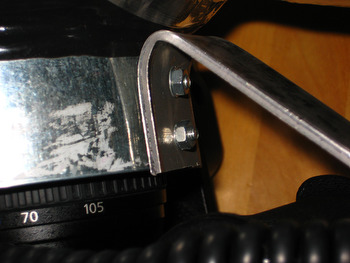
I couldn’t find a work lamp as big as his though so I used one that was 2″ smaller. After some testing I found the “ring look” wasn’t quite what I wanted so I started all over will a 15″ stainles steel salad bowl and a 6″-to-7″ air duct spacer. I bought two flexible plastic cutting boards from Le Gnome and cut them for diffuser. Finally I painted the whole thing black to add baddassedness.
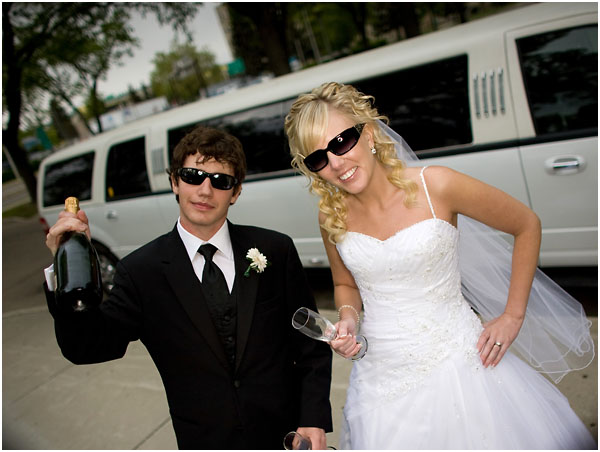
The light works great and is powerful with two speedlights pumping into it BUUUTTTT…. it’s soooo heavy! And goofy looking. A kid once litterally asked me if it was a time machine! I think I’m going to eventually buy one of those Ray Flashes but for now I’m happy that this thing cost less than $30 to build.


![DIY_Camera_Gyro_Stabilizer_by_Ryan_Jackson_2013y06m10d13h39m17sss_2013y06m10d13h39m17sss_photo[3]](http://punkoryan.com/wp-content/uploads/2014/01/DIY_Camera_Gyro_Stabilizer_by_Ryan_Jackson_2013y06m10d13h39m17sss_2013y06m10d13h39m17sss_photo3.jpg)
![DIY_Camera_Gyro_Stabilizer_by_Ryan_Jackson_2013y06m13d02h11m00sss_2013y06m13d02h11m00sss_photo[9]](http://punkoryan.com/wp-content/uploads/2014/01/DIY_Camera_Gyro_Stabilizer_by_Ryan_Jackson_2013y06m13d02h11m00sss_2013y06m13d02h11m00sss_photo9.jpg)