I’ve covered the Big Valley Jamboreeseveral, times, now, and this year I wanted to create a virtual tour that showed how BVJ is more than just music. There’s partying, bull riding, music workshops, more partying, and of course country music.
I shot several still image panoramas with my Canon 5D-Mark III and the handy dandy Canon 8-15mmL fish eye lens.
I also shot two 360 videos using six GoPro Hero cameras on a stick. Everything was stitched together using PTgui and I used KrPano as the viewer.
Click here to watch the virtual tour. Click the right and left arrows to go to the next panorama. If you click on the little globe button you can see a map of the area with dots.
The more I do these, the easier they get. I literally put this together in one day. So much cooler than just a photo gallery.
Speaking of photo gallery. Here’s a photo gallery of Big Valley Jamboree 2013 too!
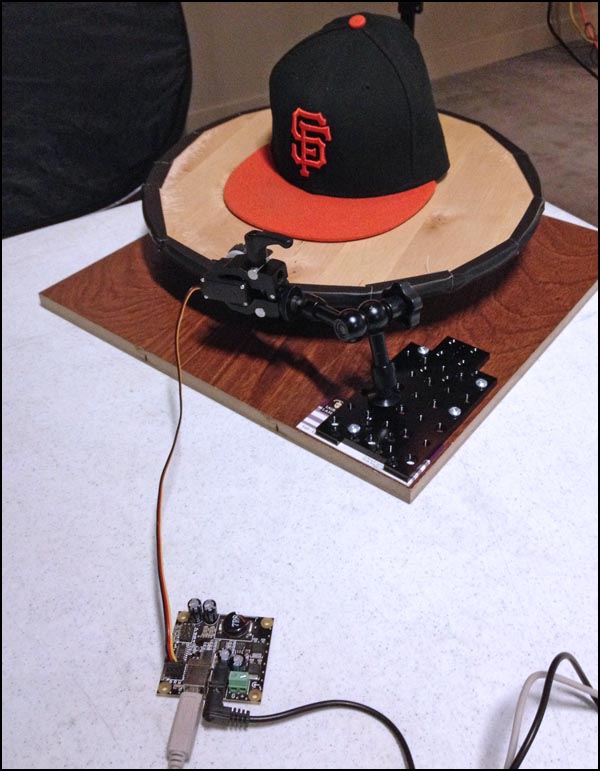
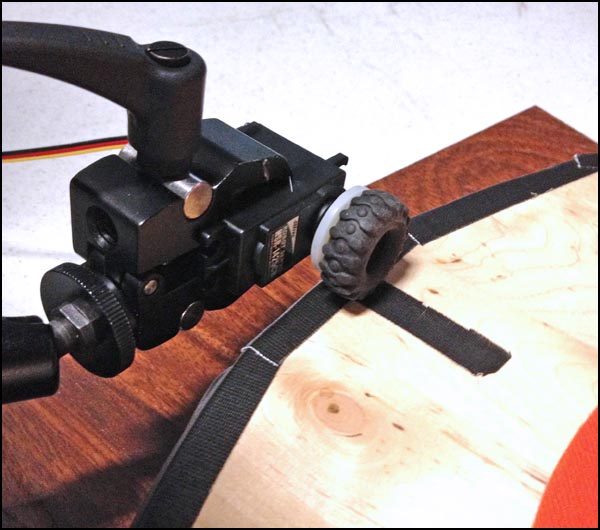
I used a spinning serving tray from Ikea and covered it in black tape. I then used a small continuous servo motor connected to a Phidget server controller and my laptop. I timed the servo so it would turn the table 10-degrees, wait 5-seconds for me to take a picture , turn 10-degrees, wait 5-seconds for me to take a picture, etc. for 360-degrees.
The little tire is from an old Meccano set.
Here’s Lucas Timmons smiling politely. I used one 24×36 soft box as my main light and two lights with grids behind to make the tiara sparkle.
Everyone loves a good story. And everyone loves trains. Combine the two and you get the Battle River Railway story.
Basically CN Rail was planning on shutting down the longest stretch of straight line track in Alberta. This would leave many towns and farmers without a railway which would cost money for the farmers and hurt the small towns along the tracks.
Instead of giving up, a co-operative was formed to purchase the tracks and a train engine and run the railway themselves.
It’s a nice David vs. Goliath kind of story that hits close to home if you grew up in the prairies like me.
I overheard Journal reporter Marty Klinkenberg and an editor talking about this story and jumped on it as I knew it would be a perfect opportunity to use a new storytelling technique I’ve been working on.
Think of it as a truly multimedia slide show incorporating stills, video, audio 360-panoramas and educational interactivity. You can play the interactive tour here. It works great on desktop and iPad but there are still some bugs with iPhone FYI.
Ever wanted to drive a train? Journal photographer Ryan Jackson has created an interactive tour of the Battle River Railway story. Take a seat at the controls of Engine 5353 and learn how to drive a train! The tour works on your desktop or mobile device. Go to http://www.edmontonjournal.com/BRR
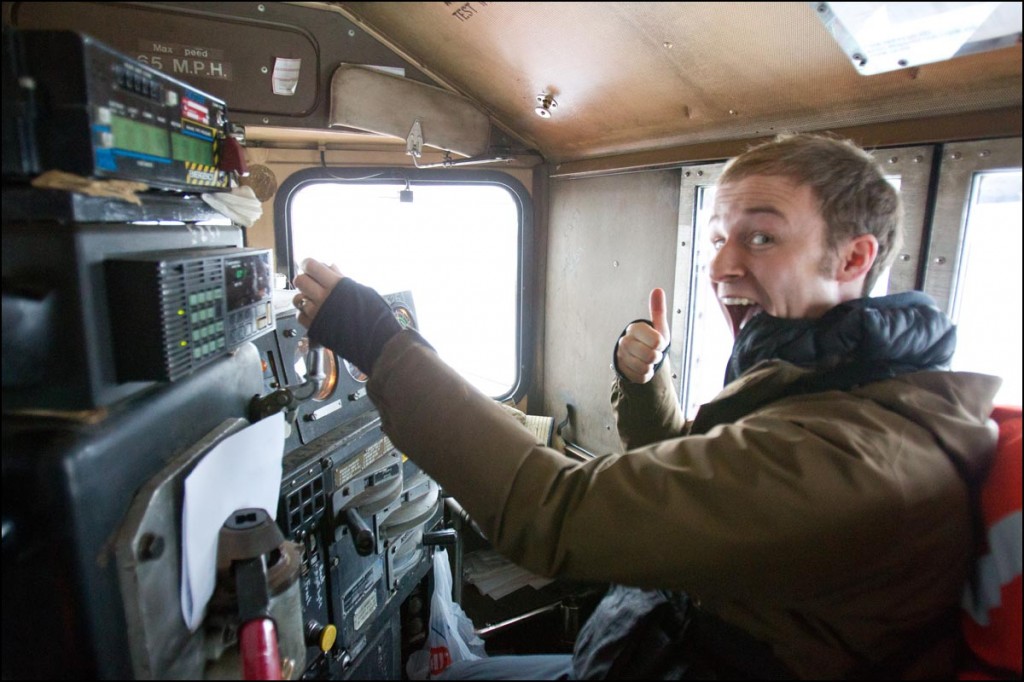
Will Munsey, volunteer Engineer for the Battle River Railway, poses for a photo in Forestburg, Alta. on December 1, 2012. The BRR is a community-owned railway line between Camrose and Alliance, Alta. The new generation co-op purchased the 80-km short-line from CN in 2008 after they announced they were going to sell off the rails for scrap. By keeping the line active, local area farmers are able to save money and time transporting their grain. The co-op also turns a profit which it returns to it’s shareholders and plans to offer tourism and oil transport in the future. Photo by Ryan Jackson / Edmonton Journal)
Battle River Railway Engine 5353 transports grain near Galahad, Alta. on December 1, 2012. The BRR is a community-owned railway line between Camrose and Alliance, Alta. The new generation co-op purchased the 80-km short-line from CN in 2008 after they announced they were going to sell off the rails for scrap. By keeping the line active, local area farmers are able to save money and time transporting their grain. The co-op also turns a profit which it returns to it’s shareholders and plans to offer tourism and oil transport in the future. Photo by Ryan Jackson / Edmonton Journal
Ken Eshpeter, Chairman and CEO of the Battle River Railway, poses for a photo in Forestburg, Alta. on December 1, 2012. The BRR is a community-owned railway line between Camrose and Alliance, Alta. The new generation co-op purchased the 80-km short-line from CN in 2008 after they announced they were going to sell off the rails for scrap. By keeping the line active, local area farmers are able to save money and time transporting their grain. The co-op also turns a profit which it returns to it’s shareholders and plans to offer tourism and oil transport in the future. (Ryan Jackson / Edmonton Journal)
Peter Wetmore, Forestburg-area farmer and railway conductor for the Battle River Railway, links two grain cars near Galahad, Alta. on December 1, 2012. The BRR is a community-owned railway line between Camrose and Alliance, Alta. The new generation co-op purchased the 80-km short-line from CN in 2008 after they announced they were going to sell off the rails for scrap. By keeping the line active, local area farmers are able to save money and time transporting their grain. The co-op also turns a profit which it returns to it’s shareholders and plans to offer tourism and oil transport in the future. (Ryan Jackson / Edmonton Journal)
Peter Wetmore, Forestburg-area farmer and railway conductor for the Battle River Railway, poses for a photo near Galahad, Alta. on December 1, 2012. The BRR is a community-owned railway line between Camrose and Alliance, Alta. The new generation co-op purchased the 80-km short-line from CN in 2008 after they announced they were going to sell off the rails for scrap. By keeping the line active, local area farmers are able to save money and time transporting their grain. The co-op also turns a profit which it returns to it’s shareholders and plans to offer tourism and oil transport in the future. (Ryan Jackson / Edmonton Journal)
Andrew Satter @asatter discusses innovative video techniques. Ryan Jackson @ryan_jackson talks about his 360-video projects and an open discussion on video with the audience happens at the end. Enjoy! Sept. 22, 2012 at Online News Association annual conference ONA12 in San Francisco. http://www.ryanjackson.ca http://www.asatter.com
Ashley and I are driving back to Edmonton from San Francisco and I have limited internet connectivity so this blog post will be fully updated with links and quotes in a couple days.P.S. If you ever get a chance to drive the west coast, DO IT!
This is a super duper quick list of the links I’ll be sharing at the #ONAunconf Unconference session at the 2012 ONA conference in San Francisco
Try to do something different. NOT TV. “make something worth talking about” – Seth Godin.
-Multimedia — use best tool to do the job. … sometimes video, sometimes sound slides, sometimes panoramas, sometimes interactives.
– I want there to be a holodeck like on Star Trek!
-I want to have the news beamed into my brain like in the Matrix or Simpsons.
PICTURE
-We’re going to get there before you know it
-28 mins of video here. people spent WAY more time on it than if it was just a normal linear video.
-think backwards. how do you wish you could watch long videos that are boring?
Immersive Video
-Best viewed on iPad.
-now this is cheesy but think of it as a little town. You could do panoramas of a small town or neighborhood and make it so you go to each section and talk to people.
-360 video on a Roller Coaster
-Start with one thing and build build build on it.
-i use KRpano.
-interfaces with VR headsets and game controllers.
-360 isn’t for everything
-A LOT OF TIME.
-must be super duper interesting topic to get good ROI
-must be something worth looking around for.
I photographed almost all the bottles at Sherbrooke Liquor. They have hundreds of brands available as single bottles so I didn’t have to open any boxes.
I setup two strip boxes and one strobe under the white background. It took about three hours to photograph all the bottles.
The Alberta Legislature building turned 100 years old this year and I was put on the fun project of profiling people who have worked at the Legislature for a long time. I also wanted to capture an epic image of the building from a different perspective.
The Alberta Legislature in Edmonton on August 21, 2012. The building turned 100-years-old this year. This image was created by stitching three separate images together into a panorama. (Ryan Jackson / Edmonton Journal)
A view of the Alberta Legislature building from the roof of the Annex building in Edmonton on August 23, 2012. (Ryan Jackson / Edmonton Journal)
A view of the Alberta Legislature building from the roof of the Annex building in Edmonton on August 23, 2012. (Ryan Jackson / Edmonton Journal)
A view of the Alberta Legislature building minutes after a severe rain storm taken from the roof of the Annex building in Edmonton on August 23, 2012. (Ryan Jackson / Edmonton Journal) This is a High Dynamic Range HDR image created from a single RAW image using PhotoMatix Pro.
Ruth Walkters maintains the plants in the building and decorates it for special occasions. She poses for a photo in the Legislature building in Edmonton on August 16, 2012. The Legislature turned 100 years old this year. (Ryan Jackson / Edmonton Journal) Shot available light. Canon 5D Mark-II. 85mm f1.2L lens. ISO160, f1.2, 1/200.
Ruth Walters maintains the plants in the building and decorates it for special occasions. She poses for a photo in the Legislature building in Edmonton on August 16, 2012. The Legislature turned 100 years old this year. (Ryan Jackson / Edmonton Journal)
Canon 5D Mark-II. 85mm f1.2 lens at f1.2. ISO100.
For this image I used strobes so that her watering can would pop more.
Judith Benson, a specialist in government documents as been a librarian at the Alberta Legislature for 26 years. She poses for a photo in the library of the Legislature building in Edmonton on August 21, 2012. The Legislature turned 100 years old this year. (Ryan Jackson / Edmonton Journal) Camera: 5D Mark-II, 24mm f1.4L, ISO 160, F14, 1/200.
June Barker has been a tour guide at the Alberta Legislature for nearly 23 years. She poses for a photo in the rotunda of the Legislature building in Edmonton on August 21, 2012. The Legislature turned 100 years old this year. (Ryan Jackson / Edmonton Journal) Canon 5D Mark-II, 24mm f3.5L Tilt-Shift lens, ISO640, F11, 1/13s. I used the 24mm tilt-shift lens to make all the lines straight. I used a slow shutter speed so I could get the background lights. The background is pretty overexposed but its better than the horrible tungsten lighting.
June Barker has been a tour guide at the Alberta Legislature for nearly 23 years. She poses for a photo in the rotunda of the Legislature building in Edmonton on August 21, 2012. The Legislature turned 100 years old this year. (Ryan Jackson / Edmonton Journal) For this image I turned the strobes all the way down to 2.5 w/s and shot wide open f1.2 with my 85mm f1.2 lens.
Alberta Legislature maintenance supervisor Terry LeBlanc stands on the roof beside the building’s cupola on August 20, 2012. The Legislature turned 100 years old this year. (Ryan Jackson / Edmonton Journal)Canon 5D Mark-II, ISO50, F10, 1/200. Alienbees Einstein strobes.I used the Canon 24mm tilt-shift lens to correct perspective as I was shooting down low.
A panoramic view of the rotunda in the Alberta Legislature in Edmonton on August 22, 2012. This image was created by stitching multiple pictures together. (Ryan Jackson / Edmonton Journal)
I used a GigaPan Epic Pro with a 5D-Mark II and a 50mm f1.2 lens for the Panorama.
Here is my camera mounted on the roof of the Annex building. I set the Canon 1D Mark-III with a 24-105mm lens to take three photos every five minutes. One normal exposure, one -1 stop and one +1 stop. The camera shot RAW and had a 32GB card in it. After three days I just picked the best photos.
Here you can see my lighting setup. I used a large octo-box to give a soft light on Ruth. I had a hair light behind her with a grid on it to narrow the beam. I had one more flash on the ground to pop a little light onto the watering can. This helps separate the can from her black pants. Also notice I got her to stand up on a chair. This was so she would be at the same height as the windows. Otherwise I would have to shoot down low which is unflattering for most portraits.
Here’s me in action. Photo by Karen Kleiss
Here you can see the Paul C. Buff PLM reflector in action. Notice how BIG and net NARROW the light beam is. Normal umbrellas spread the light in all directions where this reflector gives big light that is directional and falls off sharply.
Here is how the background lights were setup. Just normal reflectors on the strobes. Journal reporter Karen Kleiss helped move all the books.
Here’s me in action. Photo by Karen Kleiss. The PLM reflector is so big you can stand in front of it.
Here’s me in action. I LOVE the Paul C. Buff PLM reflector! Photo by Karen Kleiss.
Here is my lighting setup for the portrait of June. I hid the two background lights behind the pillars.
Up on the roof of the Alberta Legislature. One of my favorite things about working for the Edmonton Journal is getting access to cool places that are normally off limits.
For the portrait on the roof I just used two Alienbees Einstein strobes at full power to balance the sun.
The palm room in the main dome of the Alberta Legislature in Edmonton on August 24, 2012. The trees are over 80 years old and no one knows exactly where they came from. (Ryan Jackson / Edmonton Journal)
For the 360-degree panorama of the palm room I suspended my 360-degree camera with three 20-pound-test fishing lines. The camera weighs less than five pounds so I had 55-pounds of safety.
I was so terrified to suspend my camera six stories above the ground but it payed off!
The Journal's Ryan Jackson has created a fun "choose your own adventure" style 360-degree panoramic tour of Capital Ex including 360-degree videos on a roller coaster and several other rides. You can eat corn dogs, play games and watch the fireworks. The game is especially neat on a gyro-enabled iPad2 or iPhone 4. Go to http://www.edmontonjournal.com/capex360 (Ryan Jackson / Edmonton Journal)
Go to http://www.edmontonjournal.com/slavelakemap to see a panoramic before and after view of Slave Lake.
A panoramic view of the homes on 13th St. SE near 6 Ave. SE in Slave Lake, Alta. on May 23, 2011 (top) and May 2, 2012 (bottom). Nearly one-year after after a wildfire devastated the neighbourhood. Images were created by stitching multiple pictures taken taken at GPS location N55°16.582' W114°45.476' (Ryan Jackson / Edmonton Journal) To see these images in a 360-degree interactive split screen view, go to http://www.edmontonjournal.com/slavelakemap where you'll find more before-and-after photos and panoramas.
Me and Journal reporter Mariam Ibrahim about to photograph some firemen starting a controlled burn.
Sheldon Houle, Heltack Leader with Alberta Sustainable Resources Development poses for a photo with a drip torch used to start controlled burns in Slave Lake, Alta. on May 2, 2012.
A HUGE timesaver was using the EveryTrail app on my iPhone to map out a GPS trail the first time I shot the 360 tour. Then, one year later I could just retrace my path. I also used the GPSPhotoLinker program for Mac OSX to sync all my photos with GPS so I knew where each photo was taken. Some day I
I had five GoPro Hero 1080p cameras mounted on the roof of the van, They were all shooting at the same time (or close as possible) every 5-seconds.
Filming this video was pretty easy and also pretty hard!
I chose the local coffee shop Cafe Rista, 14213 103 ave. in Edmonton because it was quiet during the day and also the owner Simon was super accommodating.
He even let me put marks on the floor so I could keep the chairs and table in the exact same spot for each interview.
I spent a day in the coffee shop shooting test videos with myself in the chairs. I used this time to build templates for stitching the images and also work on the code for KRpano.
For a camera I just used my Canon 5D Mark-II with the Canon 8-15mm fisheye lens at 8mm. I kept the table and chairs in the same position for every video and the stitched them together after.
I used a little slider thing from an old enlarger to offset my lens a bit so I would find the no-parallax point. This helped make stitching the images together easier.
It was very important that I clamped the camera in the exact same spot for all of the interviews and also that the tables and chairs were in the exact same spot every time.
Here’s me interviewing Premier Alison Redford. The wonderful and talented Journal reporter Trish Audette actually came up with all the smart questions that I asked
For sound I used my Sennheiser wireless lav mic and I had my trusty Olympus recorder as a backup. I used my LitePanels MicroPro as a fill light.
After interviewing each leader separately and in different chairs, I used Final Cut Pro to align all the video clips. I then batch exported all the video clips and used Quicktime Pro to extract the video files into image sequences.
Once all the video was converted into still images I used PTgui to create a template and then batch stitch all of the still images into panoramas.
I them recombined all the panoramas back into video files using Quicktime Pro and synced the audio back.
I explain the process a little better here though my workflow has vastly improved since then. It pretty much changes every time I do a 360-video.
I used the amazing KRpano for displaying the 360-degree video. The HTML and Flash panorama viewer is very powerful. Pretty much anything is possible.
In total there was 31 minutes and 50 seconds of video which works out to 45802 panoramas that I had to stitch together.
Needless to say I’ve been sitting in front of my computer way too much lately!
This has certainly been my most complicated video to date but also one of the most fun an innovative to create.
It’s not the holodeck… but we’re getting closer!
And here’s how it ran in the paper. I was sure that the caption explained that this was created from four separate images and it said “Photo Illustration by Ryan Jackson”
I was invited to speak at VendAsta Technologies about the work I’ve done on 360 panoramas and video. It was really cool because I’ve talked dozens of times about photography and video but I’ve never given a full presentation about 360 panoramas.
As I explain in the video , I’ve always been fascinated with the Holodeck from Star Trek and we are slowly getting closer and closer.
As a photojournalist I always get to go to places and see things that most people don’t and I find that 360-degree panoramas with audio or 360 Video can help give you the same experience.
At the pace of technology today. What’s stopping us from being able to download a 360-degree video into our brains in the future?




![Will Munsey, volunteer Engineer for the Battle River Railway, poses for a photo in Forestburg, Alta. on December 1, 2012. The BRR is a community-owned railway line between Camrose and Alliance, Alta. The new generation co-op purchased the 80-km short-line from CN in 2008 after they announced they were going to sell off the rails for scrap. By keeping the line active, local area farmers are able to save money and time transporting their grain. The co-op also turns a profit which it returns to it's shareholders and plans to offer tourism and oil transport in the future. [Note: Munsey is also the president of the Alberta Party. That is unrelated to the story] (Ryan Jackson / Edmonton Journal)](http://punkoryan.com/wp-content/uploads/2013/01/rj_Battle_River_Railway_20121201_04-1024x682.jpg)




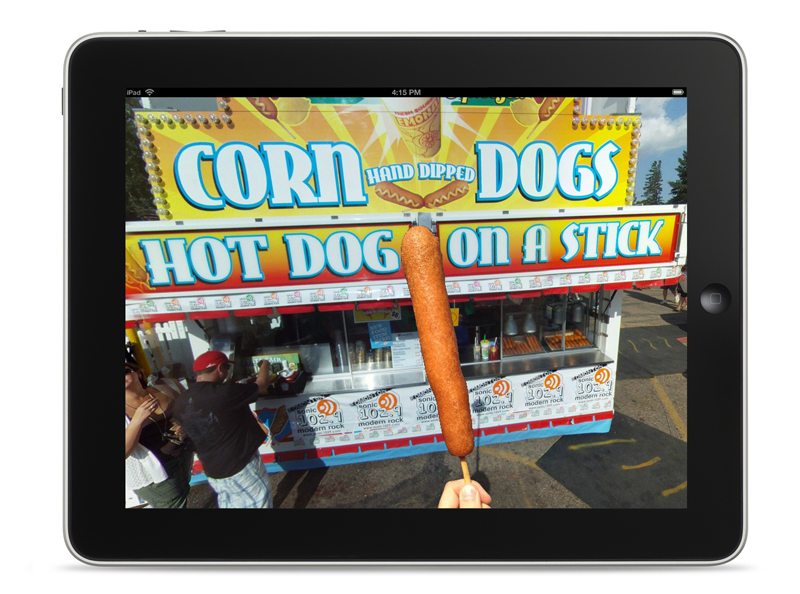


 And here’s how it ran in the paper. I was sure that the caption explained that this was created from four separate images and it said “Photo Illustration by Ryan Jackson”


